

Your broker sends an email: leverage on your account is changing. Maybe they are applying new limits, maybe your account moved to a different entity, maybe it is a prop firm account with its own leverage. You wonder whether you need to do anything to the EA running on your VPS.
The short answer: leverage does not change how much you make or lose per pip. It changes how much margin each trade uses. Whether that matters depends on how your EA sizes trades and how much of your account it already uses. This post explains the difference, which EAs are affected, and what to check.
What Leverage Actually Changes
Leverage sets how much margin the broker holds for a position. For a forex pair, the margin needed is roughly:
Margin = position size x price / leverage
One standard lot of EURUSD is 100,000 euros. At a price of 1.10 that is a $110,000 position. At 1:100 leverage the broker holds about $1,100 of margin. At 1:30 it holds about $3,667. The exact figure depends on the symbol, the broker’s margin settings and your account currency.
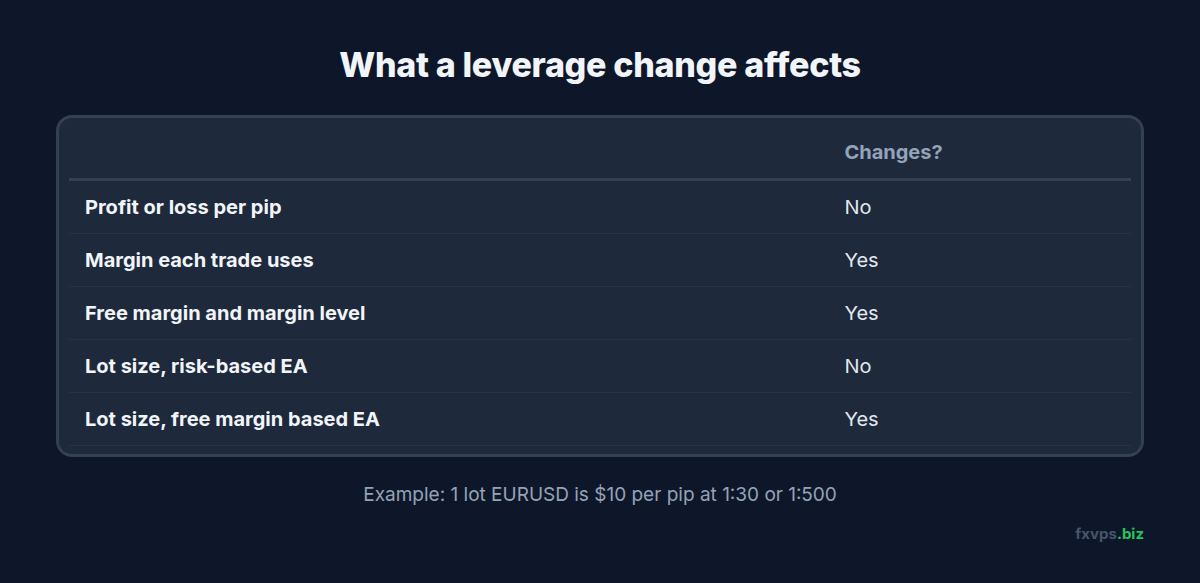
What does not change is the value of a pip. One pip on one standard lot of EURUSD is still $10, at any leverage. A 20 pip stop loss on one lot still risks $200.
📊 Key Stat: Leverage changes the margin a trade ties up, not the money it makes or loses per pip. One lot of EURUSD moves $10 per pip at 1:30 or 1:500.
The figures in this post are examples to show how the calculation works. Your broker’s actual margin requirement for each symbol is in the symbol specification window. See the symbol specification window.
Why Leverage Still Matters to an EA
If the risk per pip is the same, why care? Because margin is what decides whether the EA can open the trade at all, and when the broker starts closing positions.
Free Margin Runs Out Sooner
Lower leverage means each position uses more margin, which leaves less free margin. An EA that opens several positions at once, or adds to positions, may run out of free margin earlier. When it tries to open the next trade, the broker rejects it for not enough money. In MT4 that is error 134, in MT5 the return code for no money (10019). See MT4 and MT5 trade error codes explained.
Margin Level Falls Faster
Your margin level is equity divided by used margin, as a percentage. More used margin means a lower margin level for the same equity. That brings margin call and stop out closer, even though the trades have not changed. See margin level, margin call and stop out for EA traders.
Some EAs Size Trades From Margin
Most risk-based EAs calculate lot size from the stop loss distance and a percentage of balance or equity. Leverage does not enter that sum, so the lot size stays the same.
But some EAs size from free margin, or from a fixed fraction of available leverage. For those, a leverage change changes the lot size directly. Raise the leverage and the same setting opens bigger trades. Cut it and trades shrink, or fail.
⚠️ Warning: If your EA has a lot sizing mode based on free margin or leverage, a leverage increase can mean bigger positions and bigger losses per pip without you touching a single input. Read the EA’s documentation on how it calculates lot size.
Which EAs Are Most Affected
Grid and martingale EAs. These hold many positions at once and add to them as price moves against them. Margin is their limiting factor. With lower leverage, the same grid reaches its margin limit with fewer levels, and stop out comes sooner. See grid and martingale EA VPS requirements.
Multi-pair and basket EAs. Many positions open at once means more total margin. A leverage cut can stop the EA opening its full basket.
Hedging EAs. On MT5 hedging accounts, how much margin hedged positions use depends on the broker’s settings for the symbol. Check the specification rather than assuming. See MT5 hedging vs netting accounts for EAs.
Index, gold and crypto EAs. Leverage on these instruments is often lower than on major forex pairs and can vary by symbol, so a change may hit them harder. See VPS for index CFD traders and forex VPS for gold trading.
Single-position, risk-based EAs with a fixed stop loss are usually the least affected. They use a small part of the account’s margin and size trades from the stop distance.
Leverage Rules You May Meet
Leverage limits are often set by regulators, not just by brokers. For example, retail clients of brokers regulated in the UK and EU are limited to 30:1 on major currency pairs, with lower limits on other instruments. Brokers regulated elsewhere may offer more. Prop firms set their own leverage for their accounts.
The same broker may offer different leverage depending on which of its companies holds your account, your account type, or your balance. Some brokers also reduce leverage on larger positions, or around weekends and major news. If your broker does any of these, the margin your EA uses can change without your account leverage changing at all. Your broker’s website and your account terms are the place to check.
💡 Tip: Your broker’s client area shows your account leverage, and an EA can read it with
AccountLeverage()in MT4 orAccountInfoInteger(ACCOUNT_LEVERAGE)in MT5. Many EAs print it to the Experts tab at start up.
What to Check After a Leverage Change
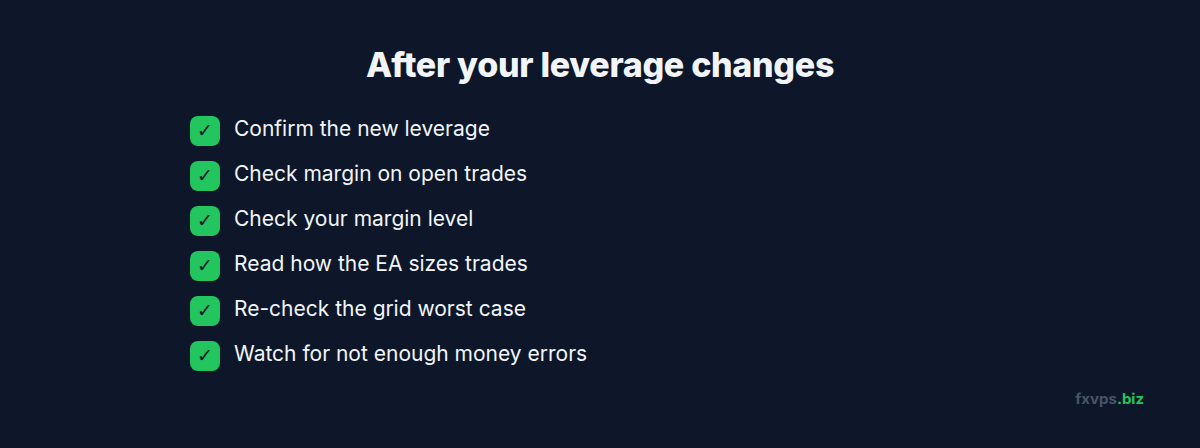
- Confirm the new leverage in your broker’s client area or in the EA’s start up message, not just in the broker’s email.
- Look at the margin each open position uses in the Trade tab. The margin and free margin figures update straight away for open trades.
- Check your margin level. If it has dropped close to your broker’s margin call level, act before the market does it for you.
- Read how your EA sizes trades. If it uses free margin or leverage, work out what lot size it will now open.
- Re-check the worst case. For grids and baskets, estimate how many positions the account can now hold before stop out.
- Watch the Experts and Journal tabs for “not enough money” errors over the next few days.
✅ Best Practice: Test leverage changes on demo first. Open a demo with the new leverage, run the EA with the same inputs on your VPS, and see how much margin it uses at its busiest. See forward testing an EA on a VPS.
Is Higher Leverage Better for EAs?
Higher leverage lets you open bigger positions with the same deposit. It does not make any trade more profitable, and it does not make losses smaller. Its real effect is to move the point at which margin runs out. For most EAs, the right lot size comes from risk per trade, not from how much the broker lets you open. If your EA is only working because of high leverage, it is probably using more of your account than it should.
Recommended FXVPS Plan
Leverage does not change the resources an EA needs, but the number of terminals and accounts does:
- Core ($29/mo, 2GB RAM, 1 vCPU): one or two terminals.
- Pro ($39/mo, 4GB RAM, 2 vCPU): several terminals, for example a demo with the new leverage alongside your live account.
- Scaling ($79/mo, 8GB RAM, 4 vCPU): many accounts and EAs.
See the pricing page, or test it on the $2.99 7-day trial.
Why FXVPS for Margin-Sensitive EAs
- 24/7 uptime, so EAs that manage margin and close positions are always there to do it.
- Servers near your broker in London, New York, Tokyo, Hong Kong and over 15 locations.
- Run demo and live side by side to test changes like a new leverage.
- Your own Windows desktop for MT4, MT5 or cTrader.
Frequently Asked Questions
Does changing leverage change my profit or loss per trade?
No. Profit and loss per pip depend on position size, not leverage. Leverage changes how much margin the position ties up.
Why does my EA now say “not enough money”?
Lower leverage means each trade uses more margin, so the account runs out of free margin sooner. The EA’s next trade is rejected.
Will my EA open bigger trades with higher leverage?
Only if it sizes trades from free margin or leverage. Risk-based EAs that size from the stop loss distance open the same lot size.
Which EAs are most affected by a leverage cut?
Grid, martingale and basket EAs that hold many positions at once, because margin is what limits them.
Where do I see my account leverage?
In your broker’s client area. Many EAs also print it to the Experts tab when they start.