

An EA that worked perfectly on your demo account goes live on MT5 and does something strange. It tries to open a second buy and instead your first buy gets bigger. It sends a sell to hedge and your long position simply disappears. Or it refuses to trade at all because it cannot find the position it just opened.
The cause is usually not the VPS, the broker’s execution or a bug in the EA’s signals. It is the account’s position accounting mode. MT5 accounts are either hedging or netting, and an EA written for one can misbehave badly on the other.
This post explains the difference, how to tell which mode your account uses, and what to check before you put an MT5 EA live on your VPS.
The Two Modes in One Sentence Each
- Hedging: every order opens its own position, so you can hold several buys and sells on the same symbol at once, each with its own ticket, stop loss and take profit.
- Netting: there is at most one position per symbol, and every new order on that symbol adds to it, reduces it, closes it or reverses it.
MetaTrader 5 originally supported only netting, which is how exchange-traded markets work. Hedging mode was added in 2016, and it is now what most retail forex and CFD brokers offer by default. Netting is still common on accounts that trade exchange markets such as futures and stocks, and some forex brokers offer it as an option.
There is also an exchange mode, used for exchange-traded instruments. For an EA it behaves like netting: one position per symbol.
📊 Key Stat: The mode is set per account by the broker when the account is opened. You cannot switch an existing account between hedging and netting from the terminal. If you need the other mode, you open a new account.
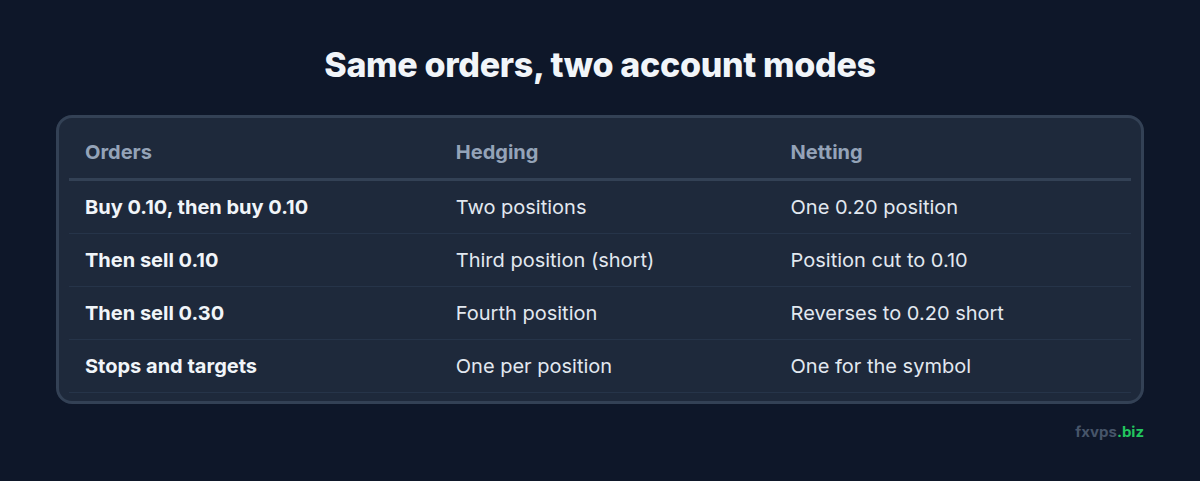
What Changes for an EA
Opening a Second Trade
On a hedging account, an EA that buys 0.10 lots twice ends up with two separate positions. On a netting account, it ends up with one position of 0.20 lots and an average entry price. Grid and martingale EAs, which deliberately open several positions at different prices, depend on the hedging behaviour.
Hedging Against Yourself
On a hedging account, a sell order while a buy is open creates a second position in the opposite direction. On a netting account, the sell reduces or closes the buy. If the sell is larger than the buy, the position reverses: you end up short the difference.
An EA that “locks” a losing trade with an opposite trade simply cannot do that on a netting account. The lock becomes a close.
Stops and Targets
On a hedging account, each position has its own stop loss and take profit. On a netting account, there is one stop loss and one take profit for the whole position. An EA that sets different targets for each entry, such as a scale-out with three take profits, has to manage it differently on netting, usually with partial closes.
How the EA Finds Its Position
This is where most problems start. MQL5 code written for netting often selects the position by symbol, because there can only be one. On a hedging account there may be several positions on that symbol, so selecting “the” position by symbol picks one of them, not necessarily the right one. EAs written for hedging select positions by ticket and check the magic number instead.
The reverse also bites. An EA written for hedging may count positions, expecting three after three entries, and find only one on a netting account.
Magic Numbers on Netting
On a netting account, two EAs trading the same symbol share one position. The magic number on that position is the one from the order that opened it. Whatever the second EA sends simply changes the size. Our post on magic numbers and running several EAs on one account explains why that matters.
⚠️ Warning: On a netting account, never run two EAs on the same symbol. They cannot keep separate positions, so each one’s orders change the other’s exposure. Use a hedging account, or give each EA its own account.
How to Check Which Mode Your Account Uses
There are three quick ways:
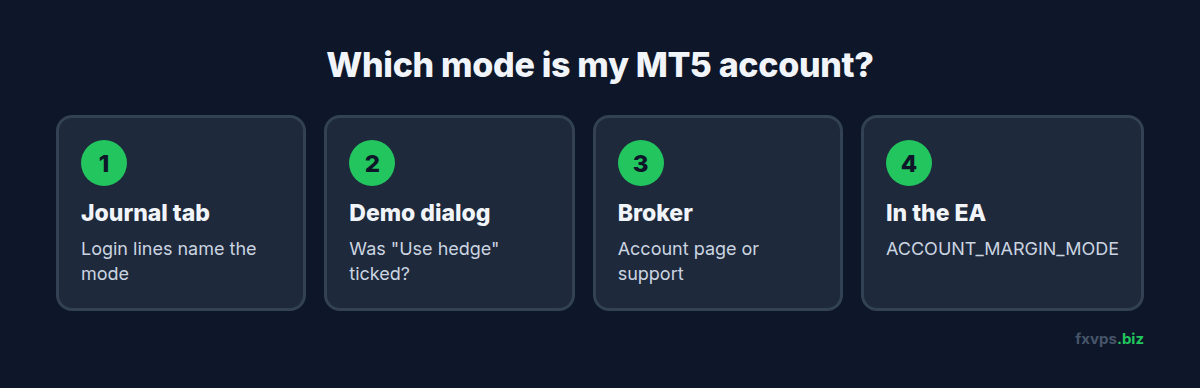
- The Journal tab. When MT5 logs in to an account, the Journal records that trading has been enabled and names the mode, hedging or netting. Open the Toolbox (Ctrl+T), click Journal, and look at the lines from your last login.
- The account opening dialog. When you open a demo account in MT5, there is a “Use hedge” option. If you created your demo with it ticked and your live account is netting (or the other way round), that explains the difference.
- Ask the broker. The account type page or your client area usually states the mode. If in doubt, support can confirm it.
An EA can check too. In MQL5 the account property ACCOUNT_MARGIN_MODE returns retail netting, exchange or retail hedging. A well-written EA reads it on start-up and refuses to run, with a clear message in the Experts tab, if the mode does not match what it was designed for.
💡 Tip: Make the demo match the live account. If you forward test on a hedging demo and go live on netting, the forward test told you very little. Our guide to forward testing an EA from demo to live covers the other things to match.
What About MT4?
MT4 has no netting mode. Every order is its own ticket, which is why EAs written for MT4 and converted to MT5 almost always assume hedging. If you are moving an MT4 EA to MT5, or buying an MT5 version of an EA you used on MT4, confirm your MT5 account is hedging before you go live.
Some regulators restrict holding opposite positions on one symbol. Brokers serving those clients may apply first-in-first-out closing or block hedges at the account level, whichever platform you use. That is a broker and jurisdiction rule, not a platform feature, so check with your broker if your EA opens opposite positions.
For a wider comparison of the two platforms on a server, see MT4 vs MT5 on a VPS in 2026.
Before You Move an MT5 EA to Your VPS
Run through this list once per EA:
- Read the EA’s documentation for a line about hedging or netting. Many vendors state it. If they do not, ask.
- Confirm your live account’s mode in the Journal, as above.
- Match the demo you test on to the live mode.
- Watch the first few trades in the Trade tab. On hedging you should see one line per entry. On netting you should see one line per symbol.
- Check the Experts tab for start-up messages. An EA that detects the wrong mode often says so there.
If you are changing broker as part of the move, our guide to migrating an EA between brokers on a VPS covers symbol names, contract sizes and the other differences that catch people out.
✅ Best Practice: Keep a short note next to each EA on the VPS: account number, account mode, symbols and magic number. When something odd happens six months from now, it is the first thing you will want to know.
Does the VPS Care Which Mode You Use?
Not really. Position accounting happens on the broker’s server, so the VPS sends the same orders either way. Two practical differences:
- Hedging accounts tend to hold more positions. A grid EA on a hedging account may hold dozens of tickets at once. The terminal handles that easily, but every position is another line the EA loops over on every tick. On a small plan with many EAs, that adds up.
- Netting EAs often trade exchange markets, such as futures and stocks, where the broker’s servers may be in a different datacenter from their forex servers. Check where the MT5 server for that account actually is before choosing a location. Our post on MT4 data centers and MT5 access points shows how.
Recommended FXVPS Plan
- Core ($29/mo, 2GB RAM, 1 vCPU): one MT5 terminal with a few EAs on either account mode.
- Pro ($39/mo, 4GB RAM, 2 vCPU): several terminals, for example a hedging account and a netting account side by side, or a grid EA holding many positions.
- Scaling ($79/mo, 8GB RAM, 4 vCPU): many terminals, multi-symbol EAs, or Strategy Tester work alongside live trading.
Compare them on the pricing page, or try a server for 7 days for $2.99 with the risk-free trial.
Frequently Asked Questions
Can I change my MT5 account from netting to hedging?
Not from the terminal. The mode is fixed when the account is opened. Ask your broker whether they offer hedging accounts, and open a new one if they do.
Why did my sell order close my buy position in MT5?
Your account is in netting mode. A sell on a symbol where you hold a buy reduces or closes the buy instead of opening a separate short position.
Is hedging or netting better for EAs?
Neither is better in general. Grid, martingale and lock-style EAs need hedging. EAs designed for exchange markets usually expect netting. Use the mode your EA was written and tested for.
Does MT4 have netting accounts?
No. Every MT4 order is a separate ticket. Some brokers apply FIFO rules or block opposite positions for regulatory reasons, but that is enforced by the broker, not a netting mode.
Will a VPS make a netting account behave like hedging?
No. Position accounting happens on the broker’s trade server. The VPS runs the terminal and the EA, but the server decides how orders combine.