

You add a second EA to the same account. It runs for two days without trouble. On the third day the first EA closes a trade it never opened, the second EA thinks it already has a position when it does not, and your account shows a loss neither strategy would have taken on its own.
Nothing is wrong with the VPS, the broker, or either EA’s logic. The two EAs simply cannot tell their trades apart. That is the job of the magic number, and it is the first thing to check whenever more than one EA shares an account.
This post explains what a magic number is, how EAs use it, what goes wrong when two EAs share one, and a short audit you can run on your VPS before adding a new strategy.
What a Magic Number Is
A magic number is an integer an EA attaches to every order it sends. The broker’s server stores it with the order and returns it with every position and every history record. It has no effect on execution. It is a label.
- In MT4, it is the
magicparameter ofOrderSend(), and an EA reads it back withOrderMagicNumber(). - In MT5, it is the
magicfield of the trade request (orCTrade.SetExpertMagicNumber()if the EA uses the standard library), and it is read back asPOSITION_MAGIC,ORDER_MAGICorDEAL_MAGIC.
Trades you place by hand from the terminal carry a magic number of 0.
Because the label lives on the broker’s server, it survives everything on your side: a terminal restart, a VPS reboot, even moving the account to a different machine. When the EA starts again, it scans the open positions, picks out the ones with its own number, and carries on managing them.
📊 Key Stat: Manual trades always carry magic number 0. Any EA that does not filter by magic number will treat your hand-placed trades as its own.
How a Well-Written EA Uses It
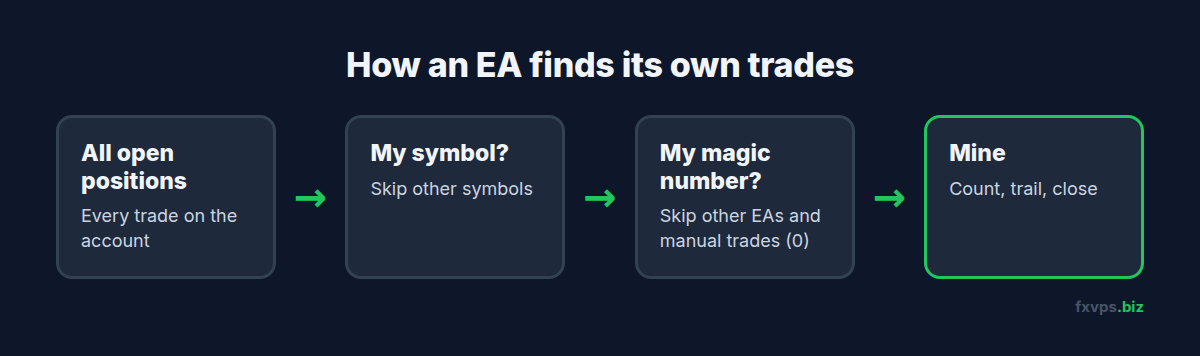
Almost every EA loops over open positions several times per tick or per bar. A typical loop asks three questions about each one:
- Is this position on my symbol?
- Does it carry my magic number?
- If both are yes, it is mine: count it, trail it, close it.
The magic number check is what keeps the loop honest. It is used for:
- Counting positions. “Do I already have a buy open?” A grid or martingale EA builds its whole state from this count.
- Closing and modifying. Trailing stops, break-even moves and basket closes act only on positions that pass the filter.
- Profit tracking. Many EAs calculate their own running profit or drawdown from history records with their magic number.
What Goes Wrong When Two EAs Share a Number
The failures are rarely dramatic at first. They show up as small oddities that compound.
One EA Closes the Other’s Trades
EA A hits its basket profit target and closes “all its positions”. If EA B uses the same magic number on the same symbol, B’s positions are closed too, often at a loss, and B then reopens them on its next signal.
Position Counts Are Wrong
EA A is allowed one trade at a time. EA B opens a position with the same number. EA A now sees one position, decides it is already in the market, and skips a valid entry. Or a grid EA counts the other EA’s trades as grid levels and sizes its next order from the wrong step.
Trailing Stops Fight Each Other
Both EAs trail “their” positions with different rules. The stop loss on a single position gets moved back and forth every tick, generating a stream of modification requests. Some brokers throttle or reject excessive modifications, and your Journal fills with errors.
Reports Stop Making Sense
If you analyse performance per EA by magic number, as most trackers and journals can, two EAs on one number appear as a single blended strategy. You cannot tell which one is earning and which one is losing.
⚠️ Warning: The same EA on two different charts is the most common clash. Many EAs ship with a default magic number such as 12345 or 123456. Attach that EA to EURUSD and GBPUSD and it is usually fine, because most EAs also filter by symbol. Attach it twice to EURUSD with different settings and the two copies will manage each other’s trades.
Not Every EA Filters by Magic Number
Some EAs ignore magic numbers entirely. Common examples:
- Basket and equity managers that close every position on the account at a profit or loss target. This is often the point of them. See equity protection EAs and kill switches.
- Trade copiers on the receiving side, which use their own numbering or comments to map copied trades.
- Simple utilities such as trailing stop tools, which may trail every position on the symbol, including manual ones.
There is nothing wrong with any of these, as long as you know which kind you are running. Read the EA’s documentation or its input list. An input called “Magic Number”, “MagicNumber” or “Magic” is a good sign the EA filters by it. A setting such as “Manage manual trades” or “Manage all trades” tells you it can be told to ignore it.
How to Assign Magic Numbers
There is no official scheme. What matters is that every running copy of every EA on one account has its own number. A simple pattern makes them easy to read later:
- First digits for the strategy. 10 for your trend EA, 20 for your mean-reversion EA, 30 for a grid.
- Last digits for the instance. 1001 for the trend EA on EURUSD, 1002 on GBPUSD, 1003 on a second EURUSD copy with different settings.
Write the scheme down in a text file on the VPS desktop or in your trade journal. Six months from now you will not remember what 2004 was.
💡 Tip: If you run the same account in more than one terminal, for example an MT4 terminal and an MT5 terminal on a broker that offers both, the numbers still need to be unique across everything trading that account. The server does not care which terminal sent the order.
A Five-Minute Magic Number Audit on Your VPS
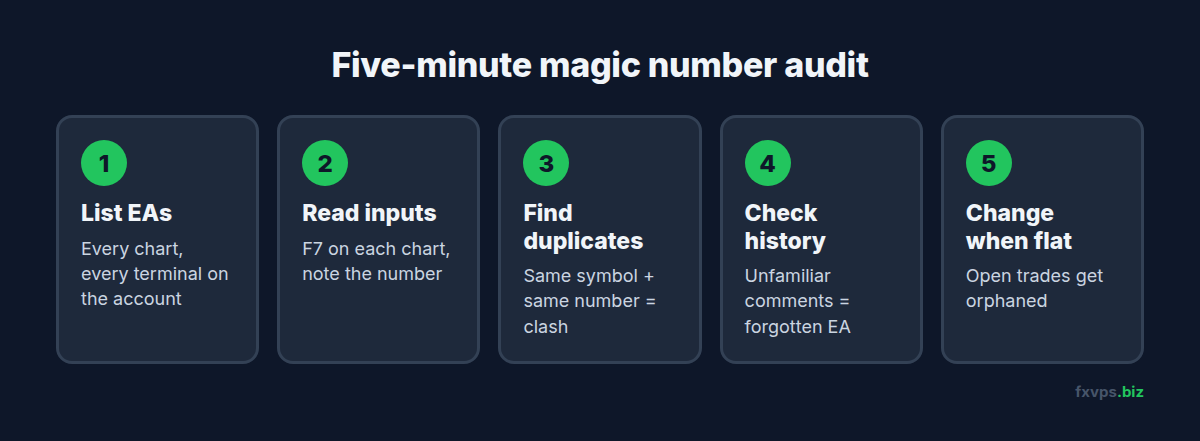
Do this before adding any new EA to an account that already runs one. The weekend is the best time, as covered in our weekly maintenance checklist.
- List every EA on the account. Check every chart in every terminal logged in to that account. In MT4 and MT5, an EA’s name appears in the top right of the chart.
- Open each EA’s inputs. Press F7 on the chart and note the magic number on the Inputs tab.
- Check for duplicates. Any two copies on the same symbol with the same number need changing.
- Check the history. In the Account History (MT4) or History (MT5) tab, look at the Comment column. Many EAs write their name into the order comment, so a trade with an unfamiliar comment points to an EA you forgot about.
- Change numbers only when flat. If an EA has open positions, changing its magic number orphans them: the EA will no longer recognise trades it opened. Close them first, or let them close, then change the input.
✅ Best Practice: Keep a short text file on the VPS listing account, terminal, chart, EA name and magic number. Update it every time you attach or remove an EA. It doubles as your recovery plan if you ever need to rebuild the setup.
Why This Matters More on a VPS
On a home PC, most traders run one or two EAs while they watch. A VPS changes the pattern. Because it runs all day and night, people tend to consolidate strategies onto it over time: a second EA, then a third, then a copy of the first with different settings. Each addition is a chance for a clash, and nobody is watching the screen when it happens.
The VPS also makes the consequences last longer. On a PC that switches off overnight, a clash stops when the terminal closes. On a VPS that runs 24/7, two EAs fighting over the same positions will keep fighting until you log in and notice.
If you are moving several strategies onto one server, our guide to running multiple EAs on one VPS covers the resource side, and running multiple MT4 and MT5 terminals covers keeping terminals separate.
When to Use Separate Accounts Instead
Magic numbers solve the bookkeeping problem. They do not solve every problem with sharing an account:
- Margin is shared. One EA’s drawdown reduces the free margin available to the others.
- Netting accounts merge positions. On an MT5 netting account, two EAs trading the same symbol share one position no matter what their magic numbers are. See MT5 hedging vs netting accounts.
- Account-wide rules apply to everything. A prop firm’s daily loss limit counts every trade on the account.
If two strategies have very different risk profiles, a separate account (or sub-account, where your broker offers them) is often cleaner than any numbering scheme.
Recommended FXVPS Plan
Several EAs on one account usually means one terminal with several charts, which is light on resources. The plan depends more on how many terminals you run in total:
- Core ($29/mo, 2GB RAM, 1 vCPU): one or two terminals with a handful of EAs.
- Pro ($39/mo, 4GB RAM, 2 vCPU): the common choice for several terminals and five or more EAs.
- Scaling ($79/mo, 8GB RAM, 4 vCPU): many terminals, multi-symbol EAs, or heavy Strategy Tester use alongside live trading.
See all plans on the pricing page, or start with the $2.99 7-day trial and run your audit on the new server before you move anything live.
Frequently Asked Questions
What happens if I change an EA’s magic number while it has open trades?
The EA stops recognising those trades. They stay open at the broker with their original stop loss and take profit, but the EA will not trail, close or count them. Change the number only when the EA has no open positions.
Do manual trades have a magic number?
Yes, 0. An EA that filters by magic number will leave them alone. An EA that does not filter, or that is set to manage manual trades, will treat them as its own.
Can two EAs share a magic number if they trade different symbols?
Usually yes, if both EAs also filter by symbol, which most do. It is still safer to give them different numbers, because it keeps your reports separate and protects you if one of them turns out not to check the symbol.
Does the magic number affect execution speed or the broker?
No. It is a label stored with the order. The broker does not use it for execution, and it adds nothing measurable to the order’s size or latency.
Is there a maximum magic number?
In MT4 it is a 32-bit integer, so keep it below about 2.1 billion. MT5 accepts a larger range. Any scheme of four to eight digits is well within both.