

Every Expert Advisor has a beautiful backtest. That is not cynicism, it is selection: nobody publishes, sells, or keeps working on an EA whose backtest looks bad. So a good backtest tells you only that the EA passed a filter every EA passes.
What separates an EA you can trust with real money from one you cannot is what happens next, when it trades prices it has never seen, through a real broker connection, with real spreads and real fills. That stage is the forward test, and most traders either skip it or run it in a way that proves nothing.
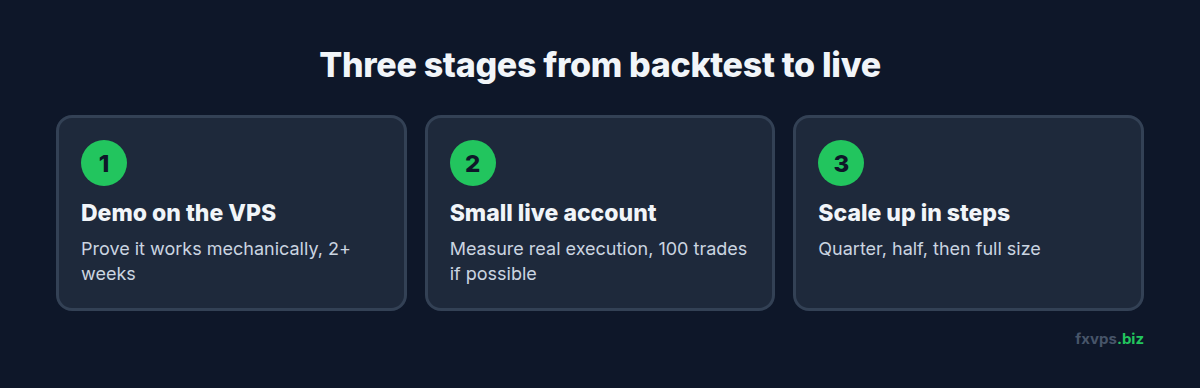
A forward test needs weeks of uninterrupted running in conditions that match where the EA will finally trade. That makes it a VPS job from the first day. This guide lays out a three-stage process and the numbers to record at each stage.
📊 Key Stat: A forward test is judged by the number of trades, not the number of days. An EA that trades twice a week needs months to produce a meaningful sample. One that trades twenty times a day can show its character in two or three weeks.
Why a Backtest Is Not Enough
The Strategy Tester is a simulation, and simulations make assumptions:
- Fills are perfect. Every order executes at the requested price. There is no slippage, no requote, and no rejected order.
- Spread is simplified. Depending on the settings and data, spread may be fixed or may not reflect the widening that happens at rollover and around news.
- Latency is zero unless you deliberately model it.
- External dependencies are missing. A news filter that relies on WebRequest does not run in the tester. See EA DLL imports and WebRequest permissions.
- The past was known. If parameters were optimised on the same data the report covers, the result describes a fit to history, not an ability to trade.
Our article on why backtests do not match live results goes through each of these. The point here is that a forward test replaces every assumption with a measurement.
Why Forward Testing Belongs on a VPS
A forward test that runs on a home PC measures the home PC.
- Gaps ruin the sample. If the terminal was off for six hours on Tuesday, you do not know what the EA would have done. Missing trades change the statistics in ways you cannot correct afterwards.
- Latency changes the result. An EA tested over a 60ms home connection and then deployed on a 2ms VPS is being run in different conditions from the test, and the reverse is worse.
- The environment should be the one you will trade in. Same Windows version, same terminal build, same location, same resource limits.
Run the test where the EA will live. Then the forward test and live trading differ in only one thing at a time.
Stage 1: Demo Account on the VPS
Purpose: prove that the EA works mechanically. Not that it is profitable.
Set It Up
- Open a demo account with the same broker and the same account type you intend to trade live. A raw-spread EA tested on a standard demo account is a different test.
- Install the terminal on the VPS, in its own folder if you already run other terminals. See installing more MT4 platforms with the same broker.
- Attach the EA with the exact settings from your backtest. Save them as a
.setfile. - Give the EA a unique magic number so its trades can be separated later.
What to Check
- The EA initialises without errors in the Experts tab.
- It opens trades at the times and in the conditions your backtest says it should.
- Lot sizes are what you expect for the account size.
- Stops and targets are placed correctly and accepted by the broker.
- It survives a terminal restart and a VPS reboot, and picks up its open trades correctly afterwards.
- It behaves properly through a weekend and a daily rollover. See the weekend gap and Sunday rollover guide.
How Long
Until it has traded through at least two full weeks including a major news release, with no mechanical faults. Problems found here cost nothing.
⚠️ Warning: Do not treat demo profit as evidence. Demo servers generally fill orders instantly at the displayed price with no rejection, and demo price feeds can differ from live ones. A scalping EA can look excellent on demo and lose steadily on live for that reason alone. Demo is for finding bugs.
Stage 2: Small Live Account on the Same VPS
Purpose: measure real execution. This is the stage that answers the question.
Set It Up
- Fund a live account with an amount you are fully prepared to lose, on the same broker and account type.
- Trade the minimum lot size the broker allows. If the broker offers a cent or micro account with live execution, that works well.
- Keep the demo terminal running alongside it with identical settings. You now have the same EA on the same VPS on demo and live at once.
- Connect both accounts to a tracker so the statistics are calculated for you. See Myfxbook and FX Blue account tracking on a VPS.
What to Measure
Slippage per trade. The difference between the price the EA requested and the price it got, on entries and exits. Record the average and the worst case.
Demo-versus-live divergence. Line up the two trade lists. Trades that appear on demo and not on live were rejected or missed. Trades with different outcomes show the cost of real fills.
Spread at entry. Particularly for trades taken near rollover or news.
Execution errors. Requotes, “off quotes”, and timeouts in the Journal. See our list of MT4 and MT5 trade error codes.
Cost per trade. Commission plus swap, as a share of the average win.
The headline statistics. Win rate, average win and loss, profit factor, and maximum drawdown, compared against the backtest for the same period.
💡 Tip: After the forward test, rerun the backtest over the exact dates of the forward test, using the same settings. If the tester shows 40 trades and a 3% gain for a period where the live account took 31 trades and lost 1%, you have measured the gap between simulation and reality for this EA.
How Long
Aim for at least 100 trades if the EA’s frequency makes that realistic, and no fewer than 30 for slower systems. Include at least one period of high volatility. A sample taken entirely from quiet weeks says little about how the EA behaves when it matters.
Stage 3: Scale Up in Steps
Purpose: find out whether the results hold as size grows.
- Increase position size in stages, for example to a quarter of the intended size, then half, then full.
- Hold each stage long enough to gather a fresh sample.
- Watch slippage as size increases. Larger orders can fill differently from minimum-lot ones.
- Set an account-level loss limit before each step. See equity protection EAs.
Decide in advance what result would make you stop. A rule written down before the test, such as “if live drawdown exceeds one and a half times the backtest maximum, I stop and review”, is worth more than any judgement made in the middle of a losing week.
Common Forward Testing Mistakes
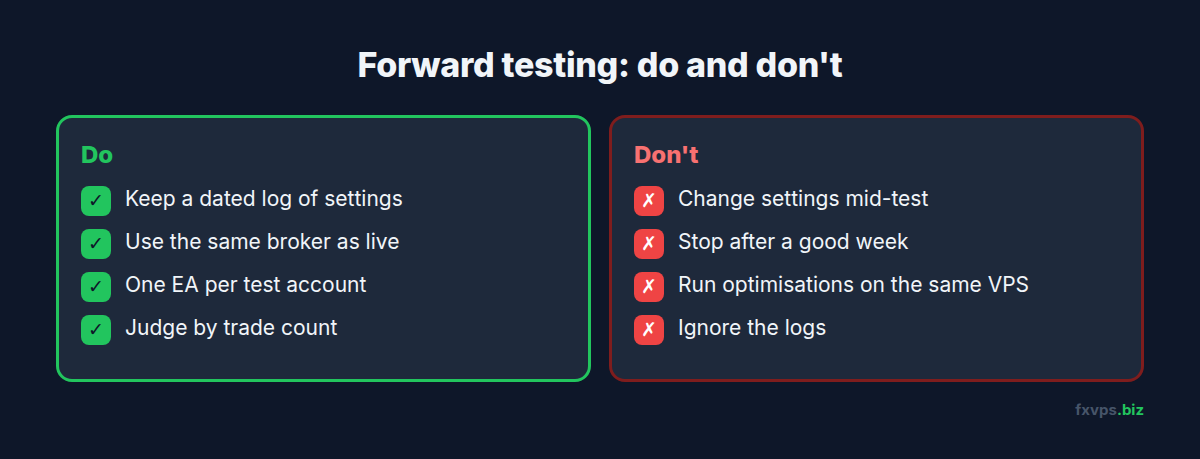
- Changing settings mid-test. Every change starts a new test. Keep a dated log of settings and treat each version separately.
- Testing on a different broker from the live one. Spreads, commission, symbol specifications, stop levels, and server time all vary. See migrating an EA between brokers.
- Stopping the test after a good week. A short winning run is the least informative result there is.
- Running too many EAs in one account. You cannot attribute the result. Use one EA per test account, or strict magic numbers. See running multiple EAs on one VPS.
- Ignoring the logs. An EA can be profitable and still be throwing errors on a fifth of its orders. See reading MT4 and MT5 log files.
- Overloading the VPS during the test. Running heavy optimisations on the same server as a forward test steals CPU from the EA under test. See strategy tester optimization on VPS.
✅ Best Practice: Keep a simple test journal: start date, EA version, settings file name, broker and account type, VPS location, and one line per week with trade count, net result, average slippage, and anything unusual. When you look back in three months, that page is what turns a pile of trades into a decision.
Recommended FXVPS Plan for Forward Testing
Core Plan ($29/mo), 2GB RAM and 1 vCPU, handles a demo terminal and a small live terminal side by side for one EA.
Pro Plan ($39/mo), 4GB RAM and 2 vCPUs, suits testing several EAs at once, each in its own terminal, or forward testing alongside your existing live accounts.
Scaling Plan ($79/mo), 8GB RAM and 4 vCPUs, is for developers running a portfolio of test and live terminals together.
Compare plans at /pricing/. If you are unsure about sizing, see how to choose the right VPS plan for your trading.
🚀 Try FXVPS for $2.99. Start Stage 1 today on a 7-day Core VPS trial and see how your EA behaves in the environment it will trade in.
Frequently Asked Questions
How long should I forward test an EA?
Long enough to collect a meaningful number of trades across different market conditions. For most intraday EAs that is four to twelve weeks. For slow swing systems it can be several months.
Is a demo forward test good enough?
It is good enough to prove the EA runs without faults. It is not good enough to prove profitability, because demo execution is more forgiving than live.
Can I forward test on the same VPS as my live accounts?
Yes, provided the server has the RAM and CPU for the extra terminals. Use separate terminal installations and watch resource usage in Task Manager during the first few days.
My forward test is worse than my backtest. Is the EA broken?
Some shortfall is normal, because real costs are higher than simulated ones. A large or growing gap suggests the backtest was over-optimised or the strategy depends on fills that live markets do not provide.
Should I use the same VPS location for testing as for live trading?
Yes. Latency is part of what you are testing. Changing location between test and live changes the conditions.
Related Reading
- Why Your Backtest Doesn’t Match Live Results — the causes behind the gap you are measuring
- How to Stress Test Your Forex VPS Before Going Live — checking the server as well as the EA
- MT4 and MT5 Strategy Tester Optimization on VPS — the stage before this one
- Why Your EA Is Losing Money: VPS Problems — separating infrastructure faults from strategy faults