

Open the settings of a commercial EA and there is a good chance you will find an input called something like “Stealth mode”, “Hidden SL/TP” or “Virtual stops”. Turn it on, and the EA no longer sends a stop loss or take profit to the broker. Instead it watches price itself and closes the trade when its own level is reached.
The pitch is that the broker cannot see your levels. The cost is less often explained: your stop loss now exists only inside a program running on a computer. If that program stops, so does your stop.
This post explains how virtual stops work, what changes when the terminal is not running, and how to use them without leaving positions unprotected.
Hard Stops vs Virtual Stops
There are two ways an EA can protect a trade.
A hard stop is the normal stop loss field on the position. The EA sends it to the broker with the order or right after. From then on the broker’s server holds it. If price reaches the level, the broker closes the trade whether your terminal is running or not.
A virtual stop is a number held inside the EA. On every price update, the EA compares the price with its own level. When price crosses it, the EA sends a market order to close the position. The broker’s server sees an open trade with no stop loss at all.
Take profit works the same way. A hard take profit is held by the broker. A virtual one is a close order the EA sends when its own target is hit.
📊 Key Stat: A hard stop loss is executed by the broker’s server. A virtual stop loss is executed by your terminal. Only one of them still works when your terminal is closed.
Why EAs Hide Their Stops
EA developers offer virtual stops for a few reasons:
- Stop hunting worries. Some traders believe that visible stops attract price spikes. Hiding the level is meant to avoid that.
- Flexible exits. An EA can close on conditions a fixed stop cannot express, such as a time limit, an indicator signal, or a basket-level loss across several positions.
- Avoiding broker minimum distances. Brokers set a minimum distance between price and a stop (the stops level). A virtual stop can sit closer than that, because it is not an order.
- Prop firm or grid logic. Basket EAs often close a whole group of trades at a combined profit or loss, which no single stop loss can represent.
Some of these are good reasons. None of them change the basic trade-off.
What Happens When the Terminal Stops
With virtual stops, everything depends on the terminal being on, connected and running the EA. Consider what happens in each failure:
- The PC sleeps or loses power. The EA stops running. The positions stay open on the broker’s server with no stop loss and no take profit.
- The internet connection drops. The EA may still be running, and may even see the level being crossed in the last prices it has, but it cannot send the close order.
- The terminal crashes or Windows restarts. When it comes back, the EA restarts and has to work out its levels again. If it kept them only in memory, they may be gone. See what your EA remembers after a restart.
- AutoTrading is switched off. The EA keeps running but cannot close anything.
In all four cases the trade has no protection at the broker. A weekend gap, a news spike or an ordinary trend can carry it as far as the market goes.
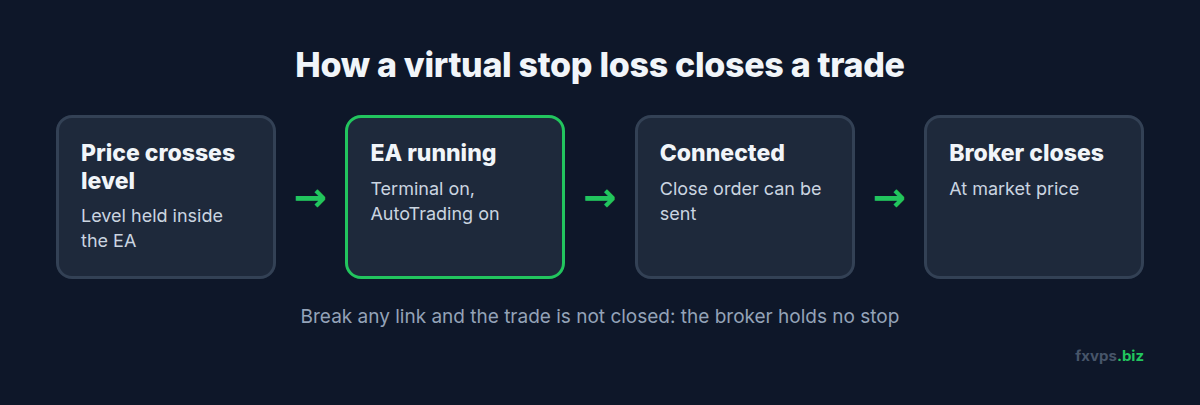
⚠️ Warning: A virtual stop loss turns a terminal outage into an unlimited-loss event. If your EA hides its stops, the uptime of the machine it runs on is part of your risk management.
The Safer Pattern: A Wide Hard Stop Behind the Virtual One
Many well-built EAs offer a middle ground, often labelled “emergency stop”, “disaster stop” or “hard SL”. The EA uses its virtual stop as normal, but also sends a real stop loss to the broker, set further away.
- In normal running, the virtual stop closes the trade first, at the level you chose.
- If the terminal goes down, the broker still holds the wider hard stop. The loss is larger than planned, but it has a limit.
If your EA has this option, use it. If it does not, ask the vendor whether it can be added, or run the EA with hidden stops switched off. Read the input descriptions carefully: some EAs call this setting something unexpected, and some only apply it to the first trade in a basket.
💡 Tip: To see what the broker actually holds, open the Trade tab in MT4 or MT5 and look at the S/L and T/P columns. An empty column on an EA position means the broker holds no stop for that trade.
Running Virtual Stops on a VPS
A VPS does not make virtual stops as safe as hard stops. What it does is remove the most common causes of a terminal outage.
- No sleep, no lid, no power cuts at home. The server runs in a data center 24/7.
- A data center connection instead of home broadband, so drops are far rarer.
- Close to your broker’s servers, so the close order the EA sends reaches the broker quickly. With a virtual stop every exit is a market order, so speed affects the price you get. See slippage, requotes and VPS latency.
Restarts still happen, for Windows updates and maintenance. Plan for them:
- Make MetaTrader start on its own with AutoTrading on, so the EA is back within a minute or two. See MetaTrader automatic startup.
- Install Windows updates at a quiet time, such as the weekend. See how and when to do Windows updates.
- Test that the EA finds its levels again after a restart, on a demo account first.
- Keep an independent safety net. An equity protection EA in a separate terminal can close everything if the account falls past a limit. See equity protection EAs and kill switches.
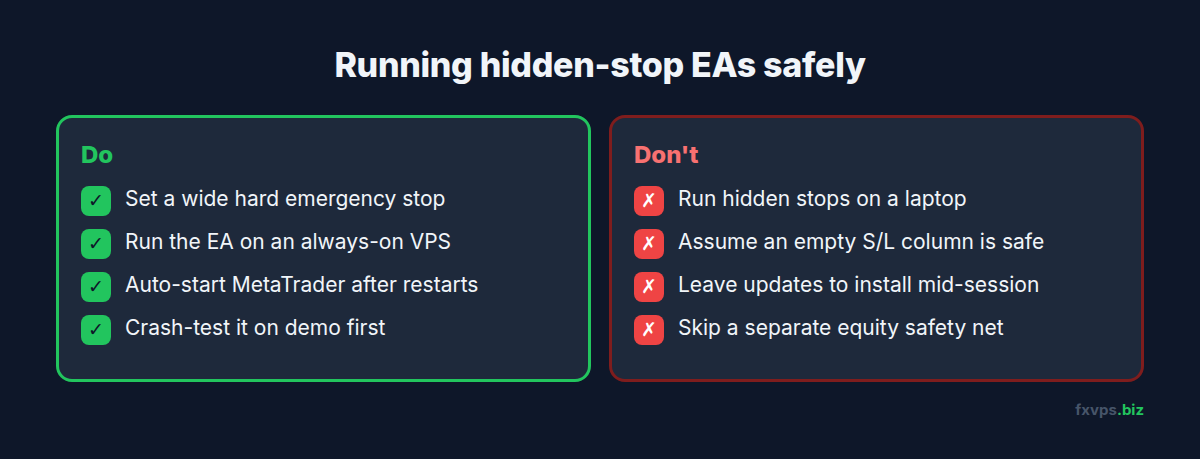
✅ Best Practice: Before going live with a hidden-stop EA, run the crash test on demo: let it open a trade, end the terminal from Task Manager, restart it, and check that the EA closes the trade at its virtual level when price reaches it.
Check Your Prop Firm’s Rules
If you trade a funded or evaluation account, check the firm’s own rules before relying on virtual stops. Some firms have rules about stop losses or maximum loss per trade, and how they treat hidden stops varies. We do not state any firm’s rules here: read the firm’s own terms or ask its support. Our post on prop firm rules and how a VPS helps with compliance covers the technical side.
Recommended FXVPS Plan
EAs with virtual stops check price on every tick, which is light work for a modern CPU. What matters most is that the server is always on:
- Core ($29/mo, 2GB RAM, 1 vCPU): one or two terminals running a hidden-stop EA.
- Pro ($39/mo, 4GB RAM, 2 vCPU): several terminals, or your EA plus a separate equity protection terminal.
- Scaling ($79/mo, 8GB RAM, 4 vCPU): many accounts and EAs.
See the pricing page, or test your EA’s restart behaviour with the $2.99 7-day trial.
Why FXVPS for Hidden-Stop EAs
- Always-on Windows servers in London, New York, Tokyo, Hong Kong and over 15 locations.
- Low latency to your broker, so the market orders a virtual stop sends arrive fast.
- Your session keeps running when you disconnect from Remote Desktop.
- Your own Windows desktop for automatic startup and a second safety terminal.
Frequently Asked Questions
What is a virtual stop loss in an EA?
It is a stop level the EA keeps internally instead of sending to the broker. When price reaches it, the EA sends a market order to close the position. The broker’s server shows no stop loss on the trade.
Does a hidden stop loss work if MT4 is closed?
No. A hidden stop only works while the terminal is running, connected and the EA is allowed to trade. If the terminal is closed, the position has no stop at the broker.
Are virtual stops better than normal stops?
They are more flexible, not more secure. They allow exits a normal stop cannot express, but they depend completely on the terminal running. A wide hard stop behind the virtual one gives you both.
How do I know if my EA uses hidden stops?
Look at its positions in the Trade tab. If the S/L and T/P columns are empty but the EA’s documentation says it uses a stop, it is managing the stop virtually. Check the EA’s inputs for settings like “stealth” or “hidden”.
Does a VPS make virtual stops safe?
It removes the most common outages, such as sleep, home power cuts and broadband drops. It cannot prevent every restart, so a hard emergency stop is still recommended.