

Your VPS restarts for a Windows update. MetaTrader comes back up, the EA reattaches to its chart, the smiley face is there, and everything looks normal. Then, over the next few hours, the EA does something odd. It opens a trade it should not have, forgets a basket it was managing, or resets a daily loss counter that had already been hit.
Nothing was broken. The EA simply forgot what it knew before the restart.
Every EA keeps some information in memory while it runs: which trades it opened, how many times it has traded today, where its grid levels sit, whether a cooldown is active. A restart wipes that memory. What happens next depends entirely on how the EA was written. This post explains what survives a restart, what does not, and how to test your EA before a restart tests it for you.
What a Restart Actually Does to an EA
When the terminal closes, each EA’s OnDeinit() function runs. When the terminal starts again and loads the saved charts, each EA’s OnInit() runs, as if you had just dragged it onto the chart for the first time.
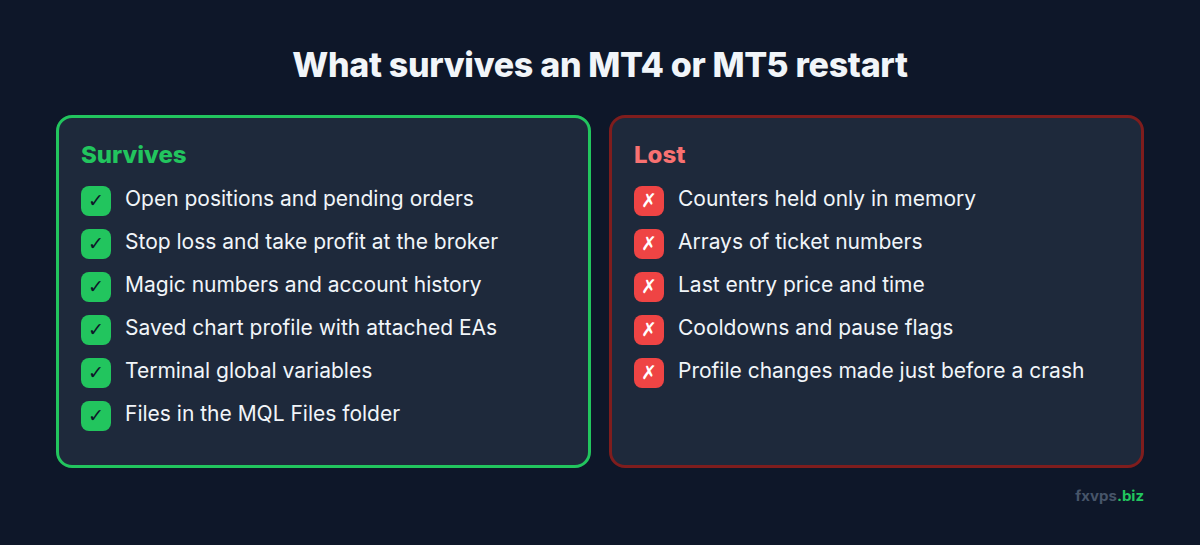
Anything the EA held only in its own variables is gone. That includes counters, flags, arrays of ticket numbers, the price of the last entry, and the time of the last trade, unless the EA saved them somewhere first.
The same reset happens in other situations too, which is why this matters even if your VPS never restarts:
- The terminal is closed and reopened, by you or by a crash.
- You change the EA’s inputs.
- The EA is recompiled while attached.
- The terminal logs in to a different account.
- The chart’s symbol or timeframe is changed.
📊 Key Stat: A planned Windows update, a broker’s server move, and a quick change to one input all cause the same thing:
OnInit()runs again. If your EA cannot rebuild its state there, every one of those is a risk.
What Survives a Restart
Some things live outside the EA and are untouched by a restart.
On the broker’s server:
- Open positions and pending orders, with their stop loss and take profit.
- The magic number and comment on each position.
- The full account history.
On your VPS, in the terminal’s data folder:
- The chart profile: which charts are open, and which EA is attached to each, with its inputs. The terminal writes this when it closes normally, so changes made just before a crash may not be saved.
- Terminal global variables, the small named values set with
GlobalVariableSet(). - Any files the EA wrote to its
MQL4\FilesorMQL5\Filesfolder.
What does not survive: everything the EA held only in memory.
How Well-Built EAs Rebuild Their State
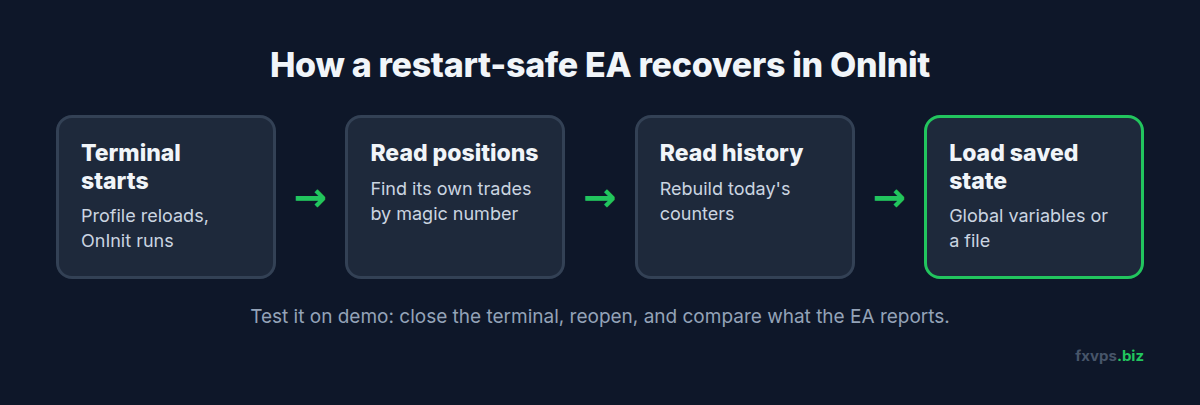
A robust EA treats OnInit() as a recovery step, not just a setup step. There are three common ways to do it.
1. Read the Positions Back From the Server
The most reliable source of truth is the account itself. On start, the EA loops through open positions and pending orders and picks out its own by magic number and symbol. In MT4 that means OrdersTotal() and OrderSelect(). In MT5, PositionsTotal() and PositionGetInteger(POSITION_MAGIC), plus OrdersTotal() for pending orders.
From that list it can work out how many trades it has open, the size of a basket, the average entry price, and where the next grid level should be. This is why unique magic numbers matter so much. See magic numbers when running several EAs on one account.
2. Read the History for Today’s Counters
Daily limits, such as “maximum three trades per day” or “stop after a 2% daily loss”, need to know what already happened today. The EA can rebuild them from closed trades in the account history, filtered by magic number and by the start of the trading day in server time. If it does not, the counter starts again at zero after every restart, and a daily limit stops being a limit.
3. Save What the Server Cannot Tell It
Some state is not visible in positions or history: a cooldown timer, a manual pause, a trailing level that has not been sent to the broker yet. For these, an EA can save values as it goes.
- Terminal global variables.
GlobalVariableSet()stores a named number that outlives the EA. MetaQuotes documents that these are kept for 4 weeks after they were last accessed, then deleted automatically.GlobalVariablesFlush()forces them to disk immediately, which protects against a crash. - Files. The EA writes a small file to its
Filesfolder and reads it back inOnInit(). Good for larger state, such as a list of grid levels.
⚠️ Warning:
GlobalVariableTemp()creates a variable that only lasts for the current terminal session. If an EA uses it for state that must survive a restart, that state is lost exactly when it is needed.
Signs Your EA Does Not Recover Properly
You can often tell from behaviour after a restart:
- It opens a new first trade while its previous basket is still open.
- A grid EA places levels as if starting fresh, doubling exposure.
- A “one trade per day” EA trades again on the same day.
- Trailing or break-even logic stops working on positions opened before the restart.
- The Experts tab shows the EA initialising, then nothing about the positions it already has.
If you see any of these, the EA is running on memory alone.
💡 Tip: Commercial EAs often describe this in their documentation as “restart safe”, “recovers open trades” or “resumes after reboot”. If the documentation says nothing, ask the vendor before you rely on it with real money.
Test It Before a Restart Tests You
You do not need to read the code to check this. Run the test on a demo account on your VPS:
- Attach the EA and let it open at least one position, ideally a full basket if it trades in groups.
- Note what it shows on the chart and in the Experts tab: trade count, basket size, next level.
- Close the terminal normally with File, Exit.
- Start it again and wait for the EA to initialise.
- Compare. Does it report the same positions, the same counters and the same next step?
- Repeat, but this time end the terminal process from Task Manager, to simulate a crash.
If the EA passes both, it will handle Windows updates, broker server moves and VPS restarts. If it fails, keep it on demo until it is fixed. Our guide to forward testing an EA from demo to live covers the rest of the process.
✅ Best Practice: Add the restart test to your go-live checklist for every new EA and every EA update. It takes ten minutes and catches one of the most expensive failure modes there is.
Making Restarts Rare and Predictable
A VPS cannot fix an EA that forgets, but it can make restarts less frequent and keep them on your schedule:
- Plan Windows updates. Install them at a quiet time, such as the weekend, rather than letting them land mid-session. See how and when to do Windows updates.
- Make the terminal start on its own. If the VPS does restart, MetaTrader should open with the right profile and AutoTrading on, without you logging in. See MetaTrader automatic startup and automating EA restarts with Task Scheduler.
- Close terminals normally when you need to restart them, so the profile is saved.
- Check after any restart that each EA has reattached and reports the positions you expect. Our weekly trading VPS maintenance checklist includes this.
Recommended FXVPS Plan
State recovery uses almost no resources. Size the server for the number of terminals and EAs you run:
- Core ($29/mo, 2GB RAM, 1 vCPU): one or two terminals with a few EAs.
- Pro ($39/mo, 4GB RAM, 2 vCPU): several terminals, or a demo terminal running restart tests alongside your live accounts.
- Scaling ($79/mo, 8GB RAM, 4 vCPU): many terminals and accounts.
See the pricing page, or run your restart test on a fresh server with the $2.99 7-day trial.
Frequently Asked Questions
Does my EA keep running when the VPS restarts?
No. The EA stops with the terminal. When MetaTrader starts again with its saved profile, the EA reloads and OnInit() runs from the beginning.
Are my open trades lost when MetaTrader restarts?
No. Positions, pending orders, stop losses and take profits are held on the broker’s server. What can be lost is the EA’s own memory of how it was managing them.
How long do MetaTrader global variables last?
MetaQuotes documents that terminal global variables are kept for 4 weeks since they were last accessed, then deleted automatically. Reading a value counts as an access.
Why did my EA open a duplicate trade after a restart?
It most likely tracked its trades only in memory. After the restart it saw no record of them and started again. A restart-safe EA reads its existing positions by magic number in OnInit().
Does changing an EA’s inputs reset it?
Yes. Changing inputs runs OnDeinit() and OnInit() again, so the same recovery logic applies.