

Ask traders who have had an account stopped out how it happened, and many describe the same thing. The EA kept opening positions, the market kept moving against them, and at some point the broker started closing trades on its own, usually the biggest losers first, at the worst prices of the day.
None of that involved a technical failure. The terminal was connected, the VPS was running, and the EA did exactly what it was told. The account simply ran out of margin.
Margin is the one risk limit that applies to every account, every broker and every strategy, and it is enforced by the broker’s server, not by anything you run. This post explains how the numbers work in MT4 and MT5, what your broker does at each level, and the checks an EA should make so you never meet the stop out level in practice.
The Four Numbers in Your Trade Tab
Open the Trade tab in MT4 or MT5 and look at the line above your positions. It shows:
- Balance: your account value from closed trades only.
- Equity: balance plus or minus the floating profit or loss on open positions. This is what your account is worth right now.
- Margin: the amount the broker has set aside as collateral for your open positions. It depends on position size, the instrument’s price and your leverage.
- Free margin: equity minus margin. This is what is available to open new positions or absorb further losses.
And one more, which matters most:
- Margin level: equity divided by margin, times 100, shown as a percentage.
A margin level of 500% means your equity is five times the margin in use. As positions lose money, equity falls, and so does the margin level.
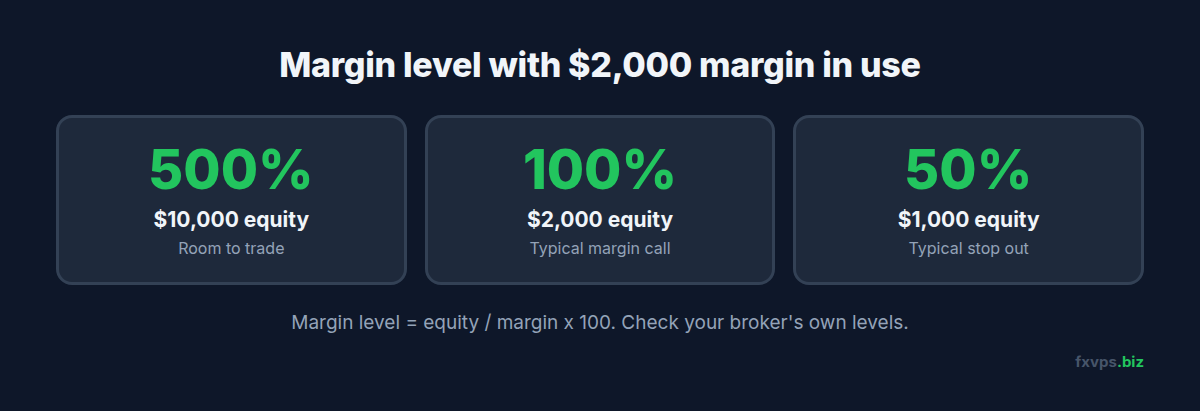
📊 Key Stat: With $10,000 equity and $2,000 margin in use, your margin level is 500%. If losses bring equity down to $2,000, it is 100%. At $1,000, it is 50%. Those are the two levels where many brokers act.
Margin Call and Stop Out
Your broker sets two thresholds, usually as margin level percentages:
- Margin call level. When your margin level falls to it, the broker warns you. In MT4 and MT5 that typically means the account summary turns red and, at many brokers, you cannot open new positions. Nothing is closed yet.
- Stop out level. When your margin level falls to it, the broker’s server starts closing your positions automatically, usually beginning with the largest losing position, until the margin level is back above the threshold.
Typical values are a margin call at 100% and a stop out at 50%, but they vary by broker, account type and entity. Some brokers set them in money instead of percent. In the UK and EU, regulators require brokers to close out retail CFD positions when the account’s margin falls to 50% of the margin required, so the stop out level for retail clients there is at least 50%.
Your broker’s account specification or client area states its levels. Check them for each account you run an EA on, because a different entity of the same broker can have different numbers.
⚠️ Warning: A stop out closes positions at market price, often in a fast-moving market. It does not wait for a good fill, and it does not ask your EA which positions to keep. If a grid or basket EA relies on holding all its positions until a combined target, a stop out breaks that logic completely.
Why a VPS Cannot Prevent a Stop Out
Stop outs happen on the broker’s trade server. Your terminal does not need to be connected, and nothing on your VPS can delay or cancel one. The same is true of your margin level: it is calculated by the server from live prices.
What a VPS does is keep your EA running, so it can manage risk before the stop out level is ever reached. An EA that checks margin and reduces exposure can only do that while it is running. On a home PC that has gone to sleep, it cannot. Our post on what stops working when your MT4 terminal goes offline covers the difference between protection that lives on the server and protection that lives in your EA.
The Margin Checks an EA Should Make
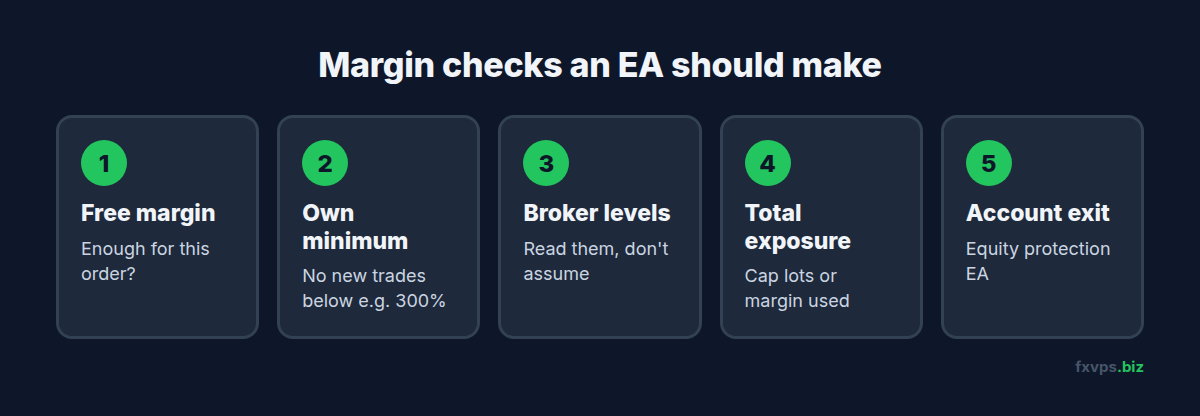
Well-written EAs check margin before every new trade. If you run commercial EAs, look for these in the inputs or documentation. If you write your own, build them in.
1. Check Free Margin Before Each Order
Before sending an order, calculate the margin it will need and confirm there is enough free margin left. In MT4, AccountFreeMarginCheck() returns the free margin that would remain after the trade. In MT5, OrderCalcMargin() returns the margin the trade would need.
If the EA skips this check, the broker rejects the order with “not enough money”: error 134 in MT4, or return code 10019 in MT5. One rejection is harmless. An EA that retries it every tick floods your logs. See MT4 and MT5 trade error codes explained.
2. Set a Minimum Margin Level for New Trades
A sensible EA refuses to open new positions when the margin level is below a threshold well above the broker’s margin call, for example 300% or 500%, depending on the strategy. In MT4, the margin level can be calculated from AccountEquity() and AccountMargin(). In MT5, AccountInfoDouble(ACCOUNT_MARGIN_LEVEL) returns it directly.
3. Read the Broker’s Levels, Do Not Assume Them
An EA can read the broker’s actual thresholds. In MT4, AccountStopoutLevel() and AccountStopoutMode() give the stop out level and whether it is in percent or money. In MT5, ACCOUNT_MARGIN_SO_CALL and ACCOUNT_MARGIN_SO_SO give the margin call and stop out levels, and ACCOUNT_MARGIN_SO_MODE says which unit they use.
4. Cap Total Exposure, Not Just Per-Trade Risk
Grid, martingale and multi-symbol EAs add positions over time. Per-trade risk can look small while total margin climbs steadily. A cap on total open lots, or on margin used as a share of equity, stops the slow build-up that leads to most stop outs. See grid and martingale EA VPS requirements.
5. Have an Account-Level Exit
An equity protection EA closes everything at a drawdown you choose, well before the broker’s stop out, so you decide which losses to take. See equity protection EAs and kill switches.
💡 Tip: Run the EA on a demo account with the same leverage, margin call and stop out levels as your live account. A margin problem shows up in a forward test much more clearly than in a backtest. See forward testing an EA from demo to live.
Things That Change Your Margin Without You Trading
Margin requirements are not fixed. Several things can raise the margin your existing positions need, and lower your margin level, without a single new trade:
- Leverage changes. Some brokers lower leverage for larger accounts, for specific instruments, or around major events.
- Weekend and event margin. Some brokers raise margin requirements before weekends, holidays or big announcements. See leaving your EA running over the holidays.
- Price moves on the instrument. Margin on many CFDs is a percentage of the position’s value, so a rising price on an index or metal increases the margin needed.
- Account currency. If your account is in a different currency from the instrument, exchange rate moves change the margin in account terms.
Prop Firm Accounts
On a funded or challenge account, the firm’s own drawdown rules will almost always stop you long before a broker stop out. Daily and maximum loss limits are calculated by the firm, often on equity. Read the firm’s rules directly and set your EA’s limits inside them. Our post on prop firm rules and how a VPS helps with compliance covers the VPS side.
✅ Best Practice: Write down three numbers for each account before you go live: the broker’s margin call level, the broker’s stop out level, and your own lower limit where the EA stops opening trades. Your limit should sit far above the other two.
Recommended FXVPS Plan
Margin checks cost almost nothing in CPU. Size the server for your terminals, and for a separate equity protection EA if you use one:
- Core ($29/mo, 2GB RAM, 1 vCPU): one or two terminals with a few EAs.
- Pro ($39/mo, 4GB RAM, 2 vCPU): several terminals, or grid and basket EAs with an equity protection EA alongside.
- Scaling ($79/mo, 8GB RAM, 4 vCPU): many terminals and accounts.
Compare plans on the pricing page, or forward test your margin settings on a fresh server with the $2.99 7-day trial.
Frequently Asked Questions
How is margin level calculated in MT4 and MT5?
Equity divided by used margin, times 100. With $5,000 equity and $1,000 margin in use, the margin level is 500%.
What is the difference between a margin call and a stop out?
A margin call is a warning level, at which many brokers also block new positions. A stop out is the level at which the broker starts closing your positions automatically.
Which position does the broker close first at stop out?
Usually the largest losing position, then the next, until the margin level recovers. The exact rule is set by the broker, so check its account terms.
Can my VPS stop a stop out from happening?
No. Stop outs are executed on the broker’s server. A VPS keeps your EA running so it can reduce risk earlier, but it cannot block the broker’s own close-out.
Why does my EA say “not enough money”?
The order needs more margin than your free margin. The EA should check free margin before sending, and reduce the lot size or skip the trade.