

The holiday season is when a VPS earns its keep. You are travelling, visiting family, or simply not at a desk, and the server keeps your EAs trading without you.
It is also the time of year when markets behave least like the data your EA was built on. Liquidity drains away, trading hours shift, spreads widen, and a few of the market’s most violent moves in recent years have happened in exactly these quiet weeks.
This post covers what changes between late November and early January, and gives you a checklist to run on your VPS before you step away. Do it once, a week or two ahead, and you can enjoy the break without opening Remote Desktop every few hours.
The Dates That Matter
The exact hours depend on your broker and the instruments you trade, but these dates affect most traders:
- US Thanksgiving, the fourth Thursday of November (26 November in 2026). US stock exchanges close, US futures run shortened hours, and many US participants take the Friday off too. Forex stays open but quiet.
- Christmas Eve and Christmas Day (24 and 25 December). Many instruments close early on the 24th, and most brokers close forex and CFD trading entirely on the 25th. In 2026, Christmas Day falls on a Friday.
- Boxing Day (26 December) is a holiday in the UK, Australia and elsewhere. In 2026 it falls on a Saturday, so UK markets observe it on Monday the 28th.
- New Year’s Eve and New Year’s Day (31 December and 1 January). Expect early closes on the 31st and closures on the 1st. In 2027, New Year’s Day falls on a Friday.
- Early January in Japan. Japanese markets take several days off around New Year, which thins out the Asian session for yen pairs.
📊 Key Stat: On 3 January 2019, with Japan on holiday and the Asian session thin, the Japanese yen jumped several percent against other currencies within minutes. Many stop losses on yen pairs filled far from their set levels. It is the standard example of what thin holiday liquidity can do.
Your broker publishes a holiday trading schedule every year, usually in its client area, by email or on its website. It lists which instruments close early, which close entirely, and when. That schedule is the authority, not this post. Read it for every instrument your EAs trade.
What Holiday Markets Do to an EA
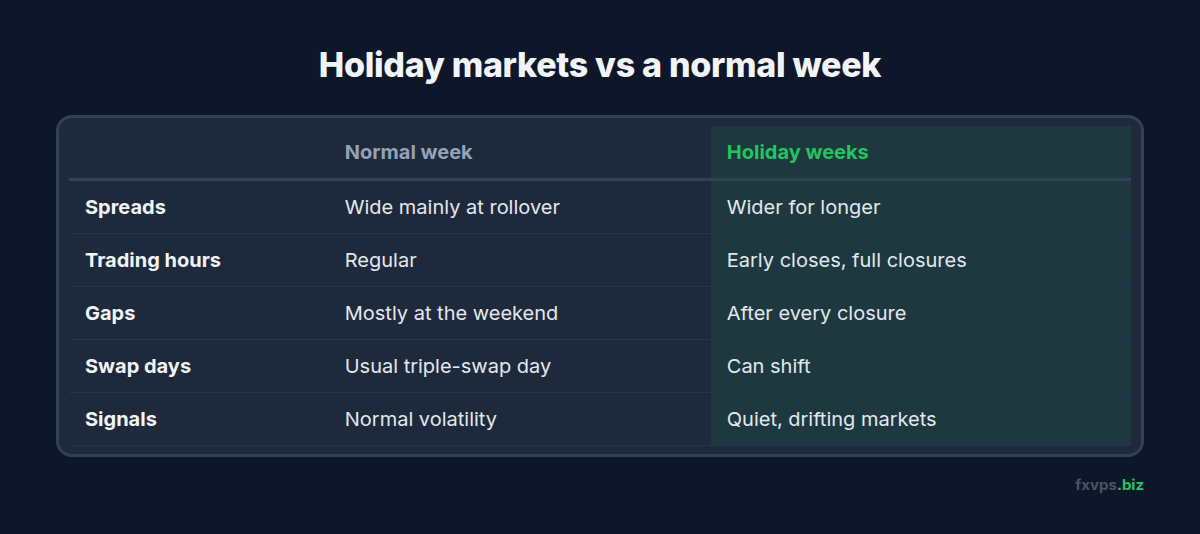
Spreads Widen and Stay Wider
With fewer banks and market makers quoting, spreads are wider for longer, not just at the daily rollover. Strategies with tight stops or small targets are the most exposed. Our post on the daily rollover spread spike explains why short positions are hit first.
Gaps Around Closures
When an instrument closes for a day and reopens, price can gap, just like over a weekend. A stop loss does not guarantee the price you set if the market opens beyond it. See the weekend gap and Sunday rollover for how gaps affect open positions.
Signals From Quiet Markets
Indicators built on volatility or volume behave differently when the market is half asleep. A breakout EA can trigger on a move that would be noise on a normal day. A mean-reversion EA can keep adding to a position as a thin market drifts one way.
Swap Days Shift
Holiday closures can move the day on which brokers charge multiple days of swap. If your EA holds positions overnight, check your broker’s swap schedule for the holiday weeks.
Time Filters Meet Short Days
An EA that closes positions at a fixed time, say 21:00 server time on Fridays, may not get the chance if the instrument closes early. Check that the early close falls after any exit your EA needs to make, or close those positions yourself first.
⚠️ Warning: Do not judge a strategy by its holiday-period results, good or bad. Thin markets are not representative. If your EA does unusually well or badly in late December, wait for normal conditions in January before changing anything.
Decide: Run, Reduce or Pause?
There is no single right answer. Three reasonable approaches:
- Run normally. Fine for swing and trend strategies with wide stops, which rarely care about a few quiet days.
- Reduce. Halve the lot size or the number of pairs, or switch off the most spread-sensitive EAs, such as scalpers, for the core holiday days.
- Pause new entries. Many EAs have an input to stop opening new trades while still managing open ones. Use it for the days around Christmas and New Year.
Whatever you decide, decide it in advance and write it down, so you are not making the call from your phone on 24 December.
The Pre-Holiday VPS Checklist
Run through this a week or two before you leave, while you still have time to fix anything it turns up.
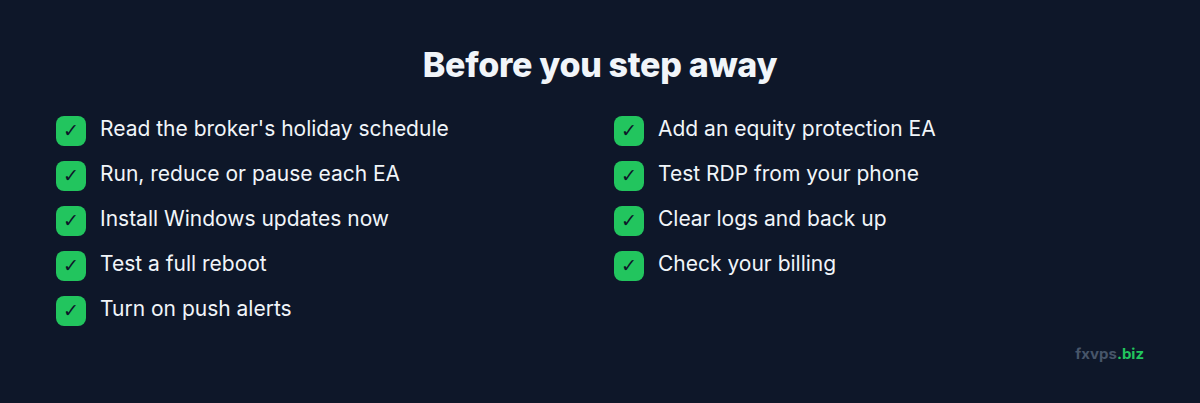
- Read your broker’s holiday schedule for every instrument your EAs trade.
- Set your EA plan. Run, reduce or pause, per EA, and make the input changes now.
- Install Windows updates now, then reboot and confirm everything comes back. You do not want an update restarting the server while you are away. See how and when to do Windows updates.
- Test a full reboot. After a restart, do your terminals start, log in and resume trading without you? If not, fix that first with our MetaTrader automatic startup guide.
- Set up alerts. Push notifications from MT4 or MT5 to your phone tell you about trades and disconnections while you are away. See push notifications and monitoring.
- Add an account-level safety net. An equity protection EA closes everything if the account drops past a level you choose. See equity protection and kill switches.
- Test remote access from your phone, from somewhere other than home, before you leave. The guide to connecting from a Mac, iPhone, iPad or Android covers it. Keep your server address, which ends in
:41011, and login details somewhere you can reach. - Check disk space and back up. Clear old logs and copy your EA settings and templates off the server. See backing up your trading data.
- Check your billing. Make sure your payment method is valid and your VPS renewal will not fail while you are away.
💡 Tip: Do the reboot test on a weekend, when the market is closed. If something does not come back, you have time to fix it without missing trades.
✅ Best Practice: Set a fixed check-in time while you are away, for example once a day after the Asian open. A two-minute look at the terminal on your phone catches most problems early and lets you ignore the rest of the time.
Why a VPS Is the Right Place for Holiday Trading
A home PC is the weakest link in an unattended setup. Power cuts, router restarts, a family member switching it off to save electricity, or an automatic update all stop your EA, and you may not find out until you get back.
A VPS sits in a datacenter with redundant power and network, so the risks that remain are the ones in this checklist: your broker’s hours, your EA’s settings, and your own access. If you run strategies that must not stop, a second server as a standby is worth considering. See standby backup VPS for expert advisors.
Recommended FXVPS Plan
Holiday trading does not need more power, but it is a good time to check your plan has headroom, because nobody will be there to close a terminal if memory runs short:
- Core ($29/mo, 2GB RAM, 1 vCPU): one or two terminals with a few EAs.
- Pro ($39/mo, 4GB RAM, 2 vCPU): several terminals, or room for an equity protection EA alongside your strategies.
- Scaling ($79/mo, 8GB RAM, 4 vCPU): many terminals and accounts.
Compare plans on the pricing page. If you are thinking of moving off a home PC before the holidays, the $2.99 7-day trial gives you a week to set up and test a reboot first.
Frequently Asked Questions
Is the forex market open on Christmas Day?
Most brokers close forex and CFD trading on 25 December, and many close early on the 24th. Hours vary by broker and instrument, so check your broker’s holiday schedule.
Should I turn my EA off over Christmas and New Year?
Not necessarily. Swing and trend EAs often run fine. Scalpers and tight-stop strategies are the ones to reduce or pause, because spreads are wider and liquidity is thin.
Will my VPS keep running while my broker is closed?
Yes. The VPS and your terminals keep running. The terminal simply cannot trade until the broker reopens. When it does, your EAs carry on.
Can a stop loss protect me from a holiday flash crash?
A stop loss closes your trade at the next available price once it is triggered. In a very fast, thin market, that price can be far from your stop. Smaller positions are the best protection.
How can I check on my EAs while travelling?
Use push notifications to your phone for trades and alerts, and connect to the VPS with Remote Desktop from a phone or laptop when you need to look at the terminal.