

You open a trade, right-click it, set a 30 pip trailing stop and go to bed. The trade runs 80 pips in your favour overnight, then reverses all the way back through your entry and hits the original stop loss. In the morning you look at the chart and wonder why the trailing stop never moved.
The answer is in one line of the MetaTrader help that most traders never read. The built-in trailing stop is not an order the broker holds. It is a job your terminal does, and it only does it while the terminal is running and connected.
This post explains exactly how MetaTrader’s trailing stop works, what the broker keeps when your terminal is off, and the ways to keep a trailing stop working around the clock.
How MetaTrader’s Built-In Trailing Stop Works
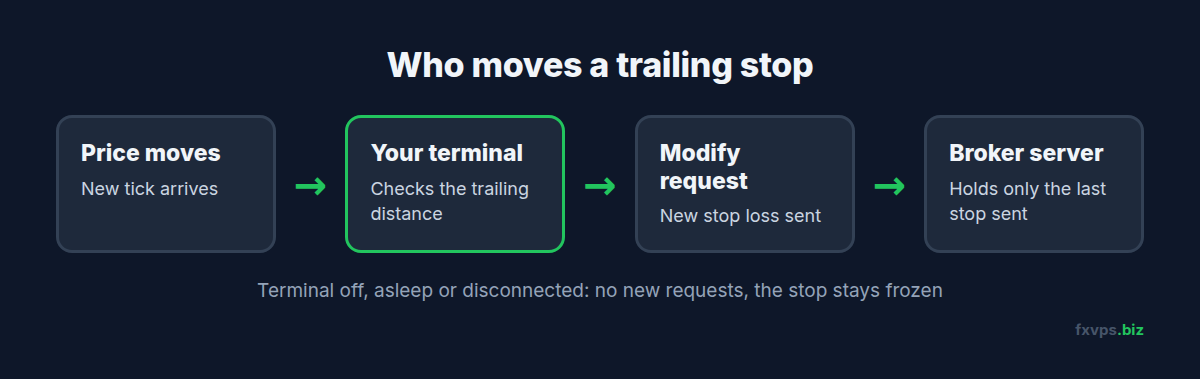
When you set a trailing stop from the right-click menu on an open position (Trailing Stop in MT4, Trailing stop in MT5), you choose a distance. From then on, every time a new price arrives, the terminal checks whether price has moved far enough in your favour. If it has, the terminal sends a request to the broker’s server to modify the position’s stop loss to the new level.
So a trailing stop is really a series of ordinary stop loss modifications, sent one by one by your terminal.
The MetaTrader 4 help states it plainly: a trailing stop is always attached to an open position and works in the client terminal, not on the server like a stop loss. It also says that, unlike a stop loss or take profit, the trailing stop will not work if the terminal is off.
📊 Key Stat: Stop loss and take profit live on the broker’s server. The built-in trailing stop lives in your terminal. If the terminal is closed, asleep or disconnected, the trailing stop does nothing at all.
What the Broker Still Holds When Your Terminal Is Off
The good news is that you are never left with no protection, as long as a stop loss was in place. Here is what happens when your terminal goes offline:
- The last stop loss the terminal sent stays on the server. If the trailing stop had already moved your stop to break even, the broker still holds the break-even stop.
- The trailing stops. No new modifications are sent, so the stop stays frozen at its last level.
- When the terminal comes back, trailing resumes from the current price, provided the trailing setting is still attached to the position.
In the example above, the trailing stop never moved because the terminal never saw the price move. If the PC went to sleep before the trade went into profit, the broker only ever held the original stop loss.
⚠️ Warning: A trailing stop set on a position with no stop loss at all gives you no protection while the terminal is off. Until the trailing stop has moved at least once, the broker holds nothing for that trade.
Common Situations Where the Trailing Stop Silently Fails
Traders rarely close the terminal on purpose with a trailing stop running. It usually stops for a less obvious reason:
- The PC went to sleep or hibernated. Laptops do this the moment the lid closes. The terminal is still “open” but not running.
- The home internet dropped. The terminal shows “No connection” and cannot send modifications, even if it is still running.
- Windows restarted for an update overnight.
- You logged in to a different account in the same terminal. The trailing stops belong to the account the terminal is connected to.
- You used the mobile app instead. Trailing stops set in the desktop terminal are not run by MetaTrader’s mobile apps, and the mobile apps do not offer the desktop trailing stop feature.
In every one of these cases the terminal looks fine when you come back, and the only sign is a stop loss that is further away than you expected.
Option 1: Keep the Terminal Running on a VPS
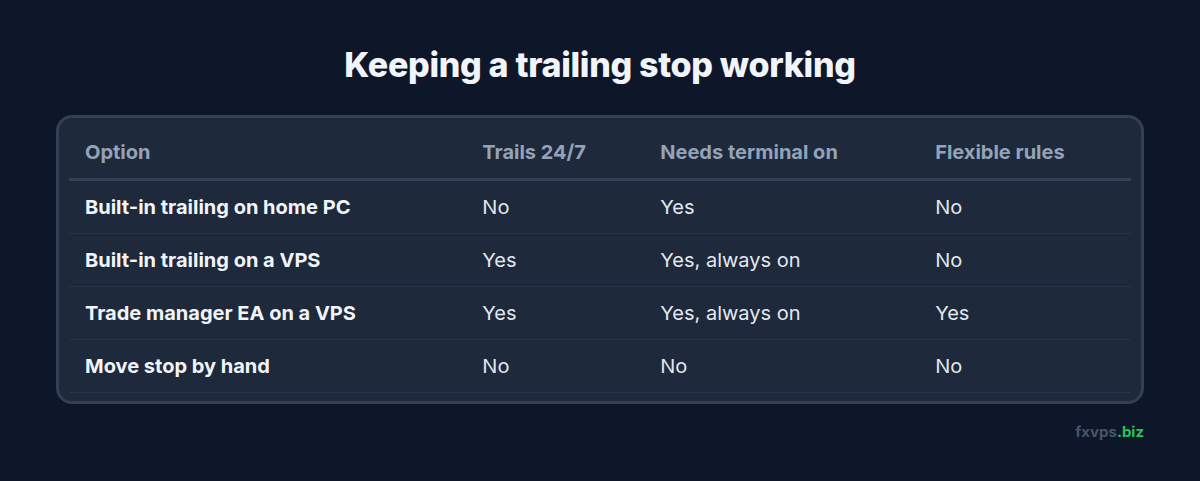
The simplest fix is to run the terminal somewhere that does not sleep, lose its connection or close its lid. A trading VPS is a Windows server in a data center that runs 24/7. You connect to it with Remote Desktop, set your trailing stop in the terminal there, and disconnect. The terminal keeps running and keeps sending stop modifications whether your own computer is on or off.
Two details matter:
- Disconnect, do not log off. Closing the Remote Desktop window keeps your session running. Choosing Sign out closes your programs, including MetaTrader. See how to properly disconnect from an RDP session.
- Make the terminal start again after a restart. If the VPS restarts for maintenance or updates, MetaTrader should open automatically. See MetaTrader automatic startup.
💡 Tip: Set the trailing stop in the terminal on the VPS, not on your home PC. A trailing stop is attached to the terminal that set it. A second terminal logged in to the same account elsewhere does not know about it.
Option 2: Use an EA to Trail Instead
An EA that manages trailing stops works the same way as the built-in feature: it sends stop loss modifications from the terminal. It still needs the terminal running, so it does not remove the need for an always-on machine. What it adds is flexibility:
- Trailing in steps, so the stop only moves every 10 pips instead of on every tick.
- Break-even first, then trailing once a further profit is reached.
- Trailing by ATR, swing lows or a moving average instead of a fixed distance.
- Applying rules to every position on the account automatically, including ones opened from your phone.
That last point is useful for manual traders. If you open trades from the mobile app, an EA on your VPS can apply the trailing rules to them. Our guide to running Expert Advisors 24/7 covers the setup.
✅ Best Practice: Whatever trails your stop, always place a real stop loss on the position as soon as it is opened. The trailing logic then only ever tightens a stop the broker already holds.
Option 3: Move the Stop Yourself Before You Shut Down
If you do not use a VPS, the manual fallback is to modify the stop loss yourself to the level you are comfortable with before you close the terminal. The broker will hold that stop. You lose the trailing, but you keep the protection.
This is fine for occasional swing trades. It does not work if you hold positions through the night regularly, or if the market moves sharply while you are away.
Things to Check on Your VPS
If you move to a VPS to keep trailing stops alive, a few minutes of checks will save you a nasty surprise:
- Confirm the terminal is connected. The connection indicator in the bottom right corner should show traffic, not “No connection”.
- Check the trailing stop is attached. Right-click the position in the Trade tab and look at the Trailing Stop menu. The active distance is ticked.
- Watch the Journal tab the first time price moves. Each stop move appears as a modification request.
- Disconnect from Remote Desktop by closing the window.
- Check from your phone later that the stop loss on the position has moved.
If modifications fail, the Journal shows the reason, such as the new stop being too close to price. See MT4 and MT5 trade error codes explained.
Recommended FXVPS Plan
A terminal running trailing stops uses very little CPU. Size the server for how many terminals you run:
- Core ($29/mo, 2GB RAM, 1 vCPU): one or two terminals, manual trading with trailing stops or a trade manager EA.
- Pro ($39/mo, 4GB RAM, 2 vCPU): several terminals or accounts, or a mix of EAs and manual trading.
- Scaling ($79/mo, 8GB RAM, 4 vCPU): many terminals, prop firm accounts and copiers.
See the pricing page, or try it with the $2.99 7-day trial.
Why FXVPS for Trailing Stops
- 24/7 Windows servers in London, New York, Tokyo, Hong Kong and more than 15 locations, so you can sit close to your broker’s servers.
- Your session keeps running when you close Remote Desktop, so the terminal keeps trailing.
- Connect from anywhere, including a phone or tablet, to check or change a trailing stop.
- Your own Windows desktop, so you can run the trade manager EA your strategy needs.
Frequently Asked Questions
Does the MT4 trailing stop work when my computer is off?
No. The MetaTrader 4 help states that the trailing stop works in the client terminal, not on the server, and will not work if the terminal is off. Only the last stop loss it set stays with the broker.
Is the MT5 trailing stop server-side?
No. MT5’s built-in trailing stop is also run by the terminal. The terminal sends stop loss modifications to the server as price moves.
Will my trailing stop work if I set it on my phone?
MetaTrader’s mobile apps do not offer the desktop trailing stop. A desktop terminal or an EA running on a VPS can trail positions you open from your phone.
What happens to my trade if the terminal disconnects?
The position stays open on the broker’s server with whatever stop loss and take profit were last sent. The stop does not move again until the terminal reconnects.
Do I need an EA for trailing stops on a VPS?
No. The built-in trailing stop works on a VPS exactly as it does at home, and it keeps working because the terminal never closes. An EA is only needed if you want more advanced trailing rules.