

Two accounts at the same broker. One advertises spreads from 0.0 pips. The other advertises no commission. Which is cheaper for your EA?
The honest answer is that it depends on your EA, and you can work it out in five minutes. Most brokers offer both types, under names like Raw, ECN, Razor, Zero or Pro on one side and Standard, Classic or Micro on the other. The total cost of a trade is the same two ingredients in both, spread and commission, mixed in different proportions.
This post shows how to compare them properly, which EAs care most, and the cost details that a headline spread hides.
The Two Ways a Broker Charges You
Standard account: no separate commission. The broker’s charge is built into a wider spread. Every trade starts slightly in the red by the width of the spread.
Raw account: the spread is close to the raw market price, often a fraction of a pip on major pairs. The broker charges a separate commission per lot traded, usually quoted per side (when you open and again when you close) or per round turn (open and close together).
Either way, you pay. The question is how much per lot, for the instruments and the times your EA actually trades.
📊 Key Stat: The cost of a trade is spread plus commission. A raw account is not cheaper because its spread is lower. It is cheaper only if the spread saving is bigger than the commission.
How to Compare the Cost Per Lot
Put both accounts into the same unit: cost per standard lot (100,000 units) for one round turn.
- Find the typical spread for each account on the pairs your EA trades. Use the broker’s published average spreads, or better, watch both accounts on demo at the hours your EA trades.
- Convert the spread to money. On EURUSD and other pairs quoted in US dollars, one pip on one standard lot is $10. A 1.2 pip spread costs $12 per lot.
- Add the round-turn commission on the raw account. If it is quoted per side, double it.
- Compare the totals.
A Worked Example
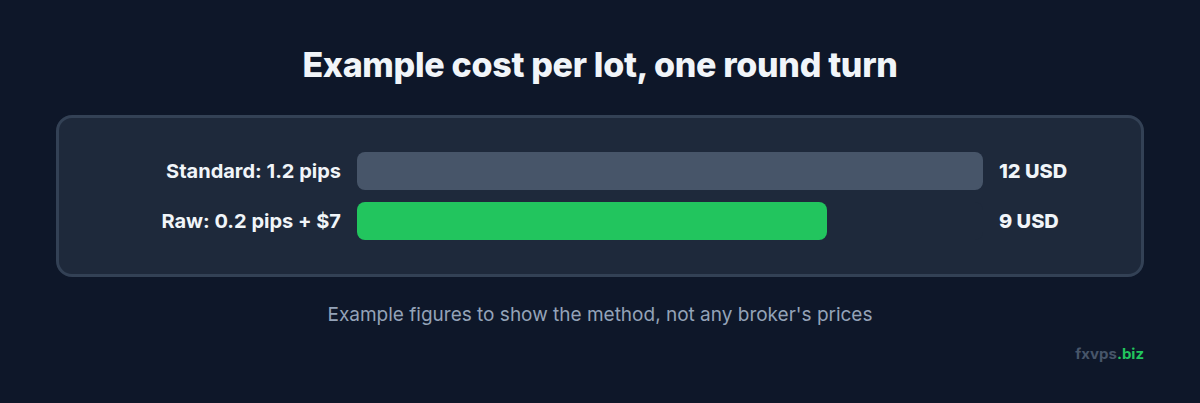
The figures below are an example to show the method, not any particular broker’s prices.
- Standard account: 1.2 pip spread, no commission. Cost per lot: 1.2 x $10 = $12.
- Raw account: 0.2 pip spread, $3.50 commission per side ($7 round turn). Cost per lot: 0.2 x $10 + $7 = $9.
In this example, the raw account saves $3 per lot. An EA trading 200 lots a month would save $600 a month. An EA trading 5 lots a month would save $15.
💡 Tip: If your broker quotes commission in your account currency or per 100,000 units of the base currency, convert it before comparing. A small mismatch in units can flip the answer.
Which EAs Care Most
The cost per trade matters in proportion to how much your EA expects to make per trade.
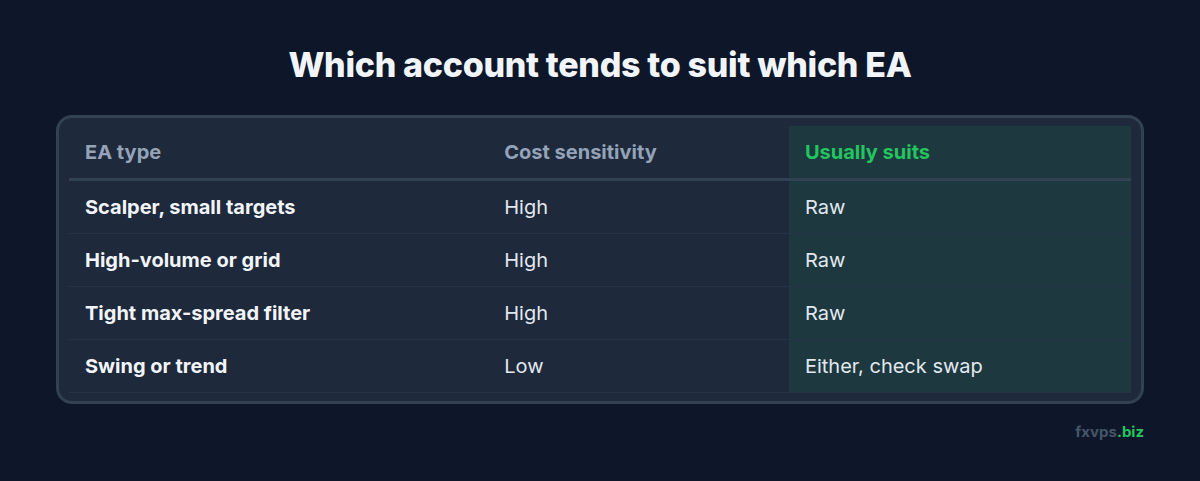
Scalpers. An EA targeting 5 pips per trade gives up a large share of every win to costs. In the example above, $12 per lot is 1.2 pips, nearly a quarter of a 5 pip target. Raw accounts usually suit scalpers. See the best forex VPS for scalping.
High-volume and grid EAs. Many trades per day, or large baskets, multiply the per-lot difference. See grid and martingale EA VPS requirements.
Swing and trend EAs. An EA targeting 100 pips per trade barely notices a 0.3 pip difference. The choice matters much less here, and other things, such as swap rates on positions held overnight, often matter more.
EAs with tight spread filters. Many EAs refuse to trade when the spread is above a set maximum. On a standard account the spread may sit above that filter most of the time, so the EA hardly trades. On a raw account the same filter is rarely triggered. Check this before blaming the EA. See daily rollover and spread widening for EAs.
⚠️ Warning: If you move an EA from a standard to a raw account, check any input expressed in spread or in “points from price”. A maximum spread setting tuned for 1.2 pip spreads may let the EA trade in conditions it was never tested on, and stop and target distances may need a second look.
Costs the Headline Spread Hides
Spread at the hours your EA trades. Advertised spreads are often averages over the trading day, or minimums. Spreads widen around the daily rollover, at news and in thin markets. An EA that trades at those times pays more than the headline on either account.
Slippage. On market orders, the price you get can differ from the price you asked for. Slippage is a real cost that neither spread nor commission shows. Running close to the broker’s server reduces the time for price to move between your order and its execution. See slippage, requotes and VPS latency.
Swap. Positions held past the daily rollover pay or earn swap. Swap rates can differ between account types at the same broker. Check the symbol specification in your terminal. See the symbol specification window.
Minimum deposits and lot sizes. Raw accounts sometimes have a higher minimum deposit. Micro or cent accounts exist for very small balances and usually have wider spreads.
Symbol names. Raw and standard accounts at the same broker often use different symbol suffixes, such as EURUSD on one and EURUSD.r or EURUSDm on another. An EA hardcoded for one will not trade on the other. See broker symbol suffixes and why your EA is not trading.
Test Both on Demo First
The surest answer comes from your own EA:
- Open a demo of each account type at your broker.
- Run the EA on both, on the same VPS, with the same inputs, for at least a couple of weeks.
- Compare the number of trades taken, the average spread at entry, and total costs per lot.
Running both on one VPS removes connection quality from the comparison, so the difference you see is the account. See forward testing an EA on a VPS.
✅ Best Practice: Write down your EA’s average cost per lot on each account and its average profit per trade. If costs are more than a small fraction of the average win, the account type is worth changing before anything else.
Recommended FXVPS Plan
Running a demo and a live terminal side by side is light work:
- Core ($29/mo, 2GB RAM, 1 vCPU): one or two terminals, enough to compare two accounts.
- Pro ($39/mo, 4GB RAM, 2 vCPU): several terminals, for testing more than one EA across both account types.
- Scaling ($79/mo, 8GB RAM, 4 vCPU): many terminals and accounts.
See the pricing page, or start your comparison on the $2.99 7-day trial.
Why FXVPS for Cost-Sensitive EAs
- Servers near your broker in London, New York, Tokyo, Hong Kong and over 15 locations, so less time for price to move on market orders.
- 24/7 uptime, so your EA takes every trade it is meant to, at the costs you tested.
- Run demo and live side by side on the same server for a fair comparison.
- Your own Windows desktop for MT4, MT5 or cTrader.
Frequently Asked Questions
Is a raw account always cheaper than a standard account?
No. A raw account is cheaper only when the spread saving is larger than the commission. Work out the cost per lot on both, at the hours your EA trades.
How do I calculate the cost per lot?
Multiply the spread in pips by the pip value per lot, then add the round-turn commission. On EURUSD, one pip on one standard lot is $10.
Which account type is best for scalping EAs?
Scalpers usually benefit from raw accounts, because costs are a large share of a small profit target. Confirm it with your own numbers on demo.
Why does my EA trade less on a standard account?
Often because of a maximum spread filter. If the standard account’s spread is usually above the EA’s limit, it skips most signals.
Does a VPS reduce trading costs?
A VPS does not change the spread or commission. Being close to the broker’s server can reduce slippage on market orders, which is part of the real cost of a trade.