

You move an EA to a new account, attach it, and it sits there. No trades, or a line in the Experts tab saying the symbol is unknown. The same EA was trading perfectly on your old account yesterday.
Very often the cause is a name. Your old broker called the euro “EURUSD”. The new one calls it “EURUSD.r”, “EURUSDm”, “EURUSD.pro” or “EURUSD+”. To a person these are the same instrument. To an EA looking for the exact string “EURUSD”, they are not.
This post explains why symbol names differ, which EAs and tools are affected, and how to set them up so the name never stops a trade.
Why Brokers Add Suffixes and Prefixes
A symbol name in MT4 or MT5 is whatever the broker configures on its server. There is no standard. Brokers add suffixes and prefixes for practical reasons:
- Account types. One server may carry several account types with different pricing, and the suffix tells them apart, for example a raw spread version and a standard version of the same pair.
- Mini, micro or cent accounts, where contract sizes differ.
- Instrument families. Cash indices and futures-based indices on the same server need different names.
- Prop firm and white-label servers, which often use their own naming.
Indices and metals vary even more than forex. The Dow Jones CFD can appear as US30, DJ30, WS30, US30.cash or other names. Gold may be XAUUSD, GOLD or XAUUSD with a suffix.
📊 Key Stat: The same EA, the same instrument and the same VPS can fail on one account and work on another for no reason other than a few characters at the end of a symbol name.
Which EAs Are Affected
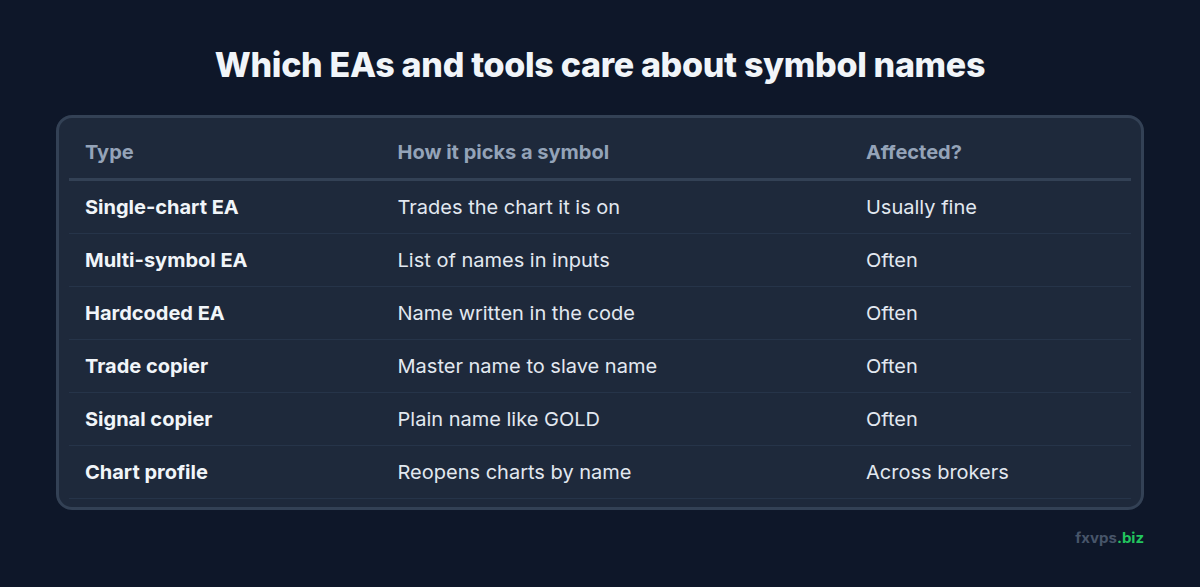
Not every EA cares about names. It depends on how the symbol is chosen.
Usually fine: single-chart EAs that trade the chart they are on. An EA that uses Symbol() in MT4 or _Symbol in MT5 trades whatever chart it is attached to. Attach it to EURUSD.r and it trades EURUSD.r.
Often affected:
- Multi-symbol EAs with a list of pairs in their inputs, such as “EURUSD,GBPUSD,USDJPY”. Each name must match the broker exactly. See one chart per symbol vs multi-symbol EAs.
- EAs with a hardcoded symbol in their code, common in basket, correlation and hedging strategies.
- Trade copiers. A trade on “US30” at the master must be mapped to “DJ30” at the slave. See copy trading setup on a VPS.
- Telegram and webhook signal copiers, which receive a plain name like “GOLD” and must translate it. See Telegram signal copier on a VPS and TradingView alerts and webhooks.
- Indicators that read other symbols, such as currency strength meters and correlation tools.
- Chart profiles and templates copied from another broker’s terminal, which reopen charts by name.
What the Error Looks Like
When an EA asks for a symbol that does not exist on the server, MetaTrader reports it as an unknown symbol:
- MT4: error 4106, unknown symbol.
- MT5: error 4301, unknown symbol, or a failed
SymbolSelect()call.
Some EAs log this clearly. Others just skip the symbol and say nothing, which is why an EA can look healthy while trading only half its pairs. For more codes, see MT4 and MT5 trade error codes explained.
⚠️ Warning: A symbol can exist on the server and still not be in Market Watch. Some EAs only see symbols that are shown there. If an EA says a symbol is unavailable, check that it is visible in Market Watch before anything else.
Find Your Broker’s Exact Names
Before changing any EA settings, get the real names:
- In MT4 or MT5, right-click inside Market Watch and choose Symbols.
- Browse the folders, or search for the instrument, for example “EUR” or “30”.
- Note every version you see. Some servers list several, with different suffixes.
- Check your account type in the broker’s client area, so you know which version your account can trade. Trading a symbol your account type does not allow is rejected.
- Right-click the symbol in Market Watch and open Specification to confirm contract size, digits and trading hours. Our post on reading the symbol specification window covers what each field means.
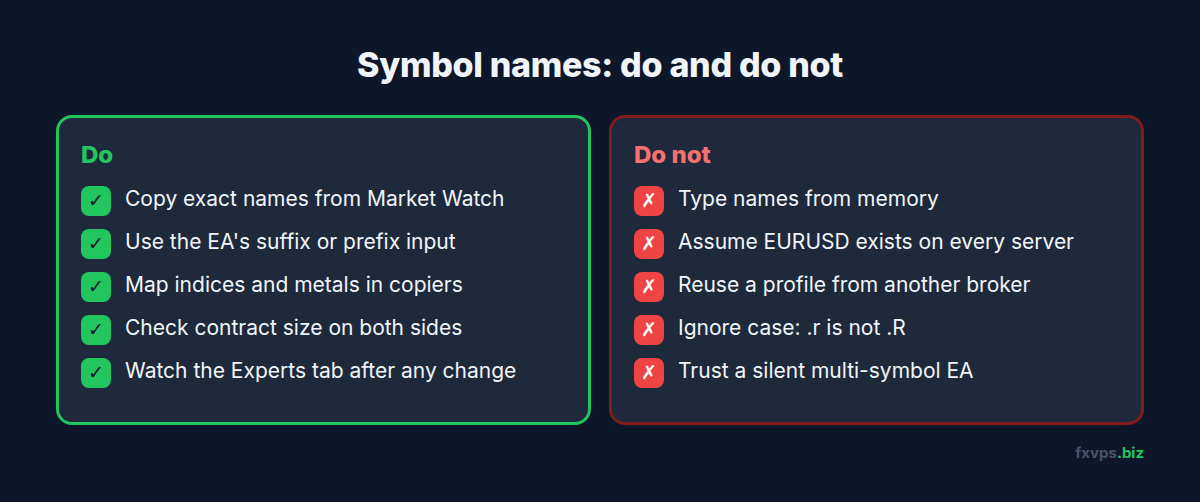
💡 Tip: Copy the exact names into a text file on your VPS, one per line, for each account. When you set up a new EA or copier, paste from the list instead of typing. Typing “EURUSD.R” instead of “EURUSD.r” is enough to break it on many servers.
Set Up EAs So Names Never Stop a Trade
Single-Chart EAs
Open a chart of the exact symbol your account trades, with the broker’s suffix, and attach the EA to it. Do not open “EURUSD” if your account trades “EURUSD.r”: on some servers both exist and only one is tradable on your account.
Multi-Symbol EAs
Look for inputs named “Suffix”, “Prefix” or “Symbol list”. Many commercial EAs let you type the list without suffixes and add the suffix in a separate field. If yours does not, type the full names exactly as Market Watch shows them.
Copiers
Use the copier’s symbol mapping table. Map each master symbol to its slave symbol explicitly, especially for indices and metals. Check the contract size on both sides too, because the same name can carry a different lot value at another broker.
Your Own Code
If you write your own EAs, avoid hardcoding names. Options include an input for the suffix, or a lookup that searches the server’s symbol list for a name containing the base symbol. In MT5, SymbolsTotal() and SymbolName() let an EA scan available symbols.
A Quick Test for Multi-Symbol EAs
A multi-symbol EA can trade some of its pairs and silently skip the rest. Before trusting it on a live account, run a short check on demo:
- Attach the EA with its full symbol list, using the broker’s exact names.
- Open the Experts tab and read the lines the EA prints when it starts. Many EAs list each symbol they loaded, or warn about the ones they could not find.
- Check that every symbol on the list is visible in Market Watch.
- If the EA has a dashboard, confirm it shows a row, a spread or a signal for every symbol, not just some of them.
- Wait for the first trade on a symbol you rarely trade, such as an index or a cross, to confirm the name works there too.
If one symbol is missing from the start-up lines, fix the name before going live. It is far easier to spot on the first day than after a month of “why does it never trade gold?”
When Names Change Under You
Symbol names can change without you moving anything:
- Your broker migrates servers or merges account types. See broker server changes on MT4 and MT5.
- You open a new account type with the same broker, such as switching from standard to raw spread.
- You move from a challenge to a funded account at a prop firm, which may sit on a different server.
- You migrate an EA to another broker. See migrating an EA between brokers.
Each time, check the names before the market opens.
✅ Best Practice: After any account or server change, open the Experts and Journal tabs for the first hour of trading. An unknown symbol error shows up on the first attempt, and catching it then costs nothing.
Recommended FXVPS Plan
Symbol names cost no resources, but multi-symbol EAs and copiers running several accounts do:
- Core ($29/mo, 2GB RAM, 1 vCPU): one or two terminals with single-chart EAs.
- Pro ($39/mo, 4GB RAM, 2 vCPU): multi-symbol EAs, or a copier with a few slave accounts.
- Scaling ($79/mo, 8GB RAM, 4 vCPU): many terminals and accounts.
Compare plans on the pricing page, or check your symbol mapping on a fresh server with the $2.99 7-day trial.
Frequently Asked Questions
Why does my broker add “.r” or “m” to symbol names?
Brokers use suffixes to separate account types, contract sizes or instrument families on the same server. The meaning varies by broker, so check its account information.
Will a VPS fix an unknown symbol error?
No. The error comes from the name, not the machine. It happens identically on any computer and is fixed in the EA’s inputs or the copier’s mapping.
My EA trades the chart it is on. Do I need to change anything?
Usually not, as long as you attach it to a chart of the exact symbol your account trades, including the suffix.
Why does my copier copy forex but not indices?
Index and metal names differ much more between brokers than forex names. Add explicit mappings for each one, and check contract sizes match.
Can two symbols with different suffixes have different prices?
Yes. Different account types can have different spreads, commissions and sometimes contract sizes. Check the specification of the exact one you trade.