

You want your strategy on twenty currency pairs. There are two ways to do it in MetaTrader. You can open twenty charts and attach the EA to each one. Or you can use a multi-symbol EA (sometimes called multi-currency), attach it to a single chart, and let it trade all twenty from there.
Both work. They behave differently when markets get busy, when something goes wrong, and when you look at Task Manager on your VPS. This post explains the trade-offs so you can pick the right setup and size your server for it.
How MetaTrader Feeds an EA
The key fact is simple: an EA’s tick event only fires for the symbol of the chart it is attached to. In both MT4 and MT5, an EA on a EURUSD chart is woken up by every new EURUSD price. A new GBPUSD price does not wake it up, even if the EA trades GBPUSD.
That single rule shapes everything else.
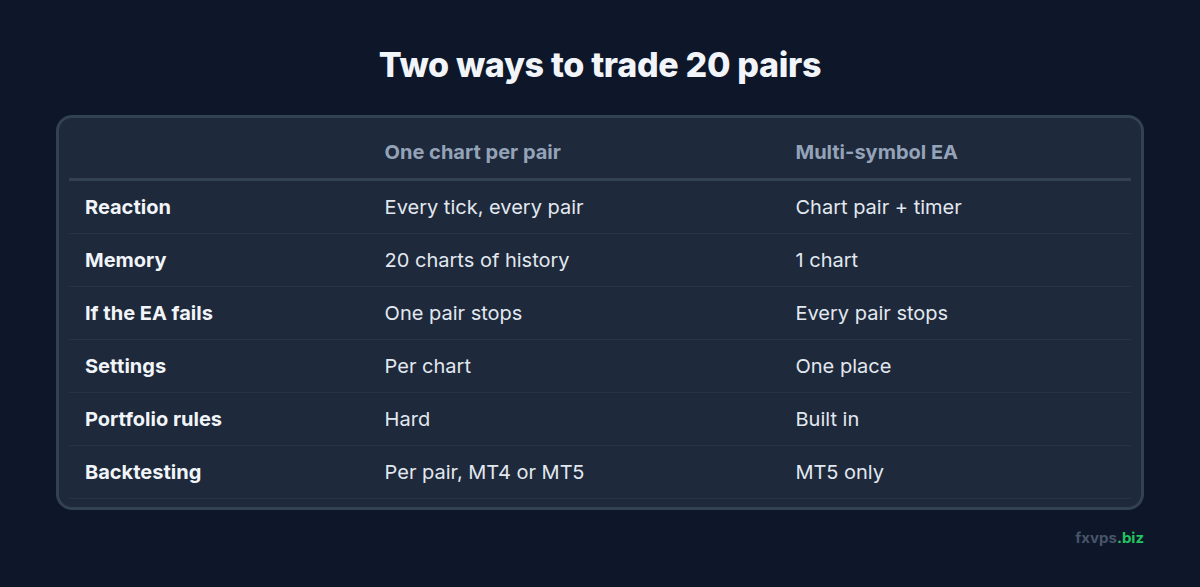
- One chart per symbol: each copy of the EA is woken by its own symbol’s ticks. Every symbol gets an immediate reaction.
- Multi-symbol EA: the EA is woken by the chart symbol’s ticks, plus, in most designs, a timer that fires every second or every few hundred milliseconds. On each wake-up it checks all its symbols in a loop.
📊 Key Stat: A multi-symbol EA on a timer reacts to other symbols only when the timer fires. If the timer runs once a second, a move on a non-chart symbol can wait up to a second before the EA sees it. For swing strategies that is irrelevant. For scalpers it matters.
Some MT5 multi-symbol EAs use more advanced methods to react to each symbol’s ticks, such as helper indicators that send events. If timing matters to your strategy, ask the vendor how their EA is notified of other symbols.
Setup 1: One Chart per Symbol
This is the classic approach, and most EAs are built for it.
Strengths:
- Immediate reaction to every tick on every symbol.
- Independent settings. Each chart can have its own inputs, lot size and magic number.
- Easy to pause one pair. Remove the EA from one chart and the others keep trading.
- Simple to test. Each pair is backtested on its own in the Strategy Tester, the same way it runs live.
Costs:
- Memory. Every open chart holds its price history in RAM. Twenty charts use noticeably more memory than one, and the effect grows with the number of bars each chart keeps.
- CPU spikes during busy moments. On a news release, every chart’s EA wakes up at once.
- Order collisions in MT4. When several EAs try to send orders at the same instant, MT4 can return error 146, “trade context busy”. Well-written MT4 EAs retry; poorly written ones skip the trade. Our guide to MT4 and MT5 trade error codes covers it.
- More to manage. Twenty charts means twenty sets of inputs to keep consistent.
Setup 2: One Multi-Symbol EA
Strengths:
- One chart, much less memory. Only one chart’s history is loaded for display. The EA requests other symbols’ data as it needs it.
- One place for settings. Change the lot size or risk once, and every symbol follows.
- Portfolio-level logic. The EA can see all its positions together: limit total exposure, stop opening new trades after a combined drawdown, or avoid holding five correlated USD trades at once.
- Orders go out one at a time from a single EA, so MT4’s trade context collisions between your own EAs disappear.
Costs:
- One point of failure. If the EA hits an error or is removed from its chart, every symbol stops at once.
- Delayed reaction on non-chart symbols if it relies on a timer.
- Testing. The MT5 Strategy Tester supports multi-symbol testing. The MT4 Strategy Tester models only the chart symbol properly, so multi-symbol EAs for MT4 are hard to backtest honestly.
- Market Watch dependency. The EA can only read prices for symbols the terminal is receiving. If a symbol is hidden from Market Watch, or its name has a suffix the EA does not expect, that symbol quietly stops trading.
⚠️ Warning: After a broker change or an account transfer, check the symbol list in a multi-symbol EA’s inputs. If your new broker uses
EURUSD.rinstead ofEURUSD, the EA will look for a symbol that does not exist. See your broker changed trade servers.
Which One Should You Use?
Choose one chart per symbol when:
- The EA was designed that way, which is true of most EAs on the market.
- You trade a handful of pairs.
- Each pair needs different settings.
- You scalp or trade news, where every tick matters.
Choose a multi-symbol EA when:
- You trade many symbols with the same logic.
- You want portfolio rules, such as a cap on total open risk.
- RAM on your VPS is the limiting factor.
- You trade MT5 and can backtest it as a whole in the Strategy Tester.
Mixing is fine too. Many traders run a multi-symbol EA for a broad, slow strategy and a separate chart-per-symbol EA for a scalper on two or three pairs.
Making Either Setup Lighter on Your VPS
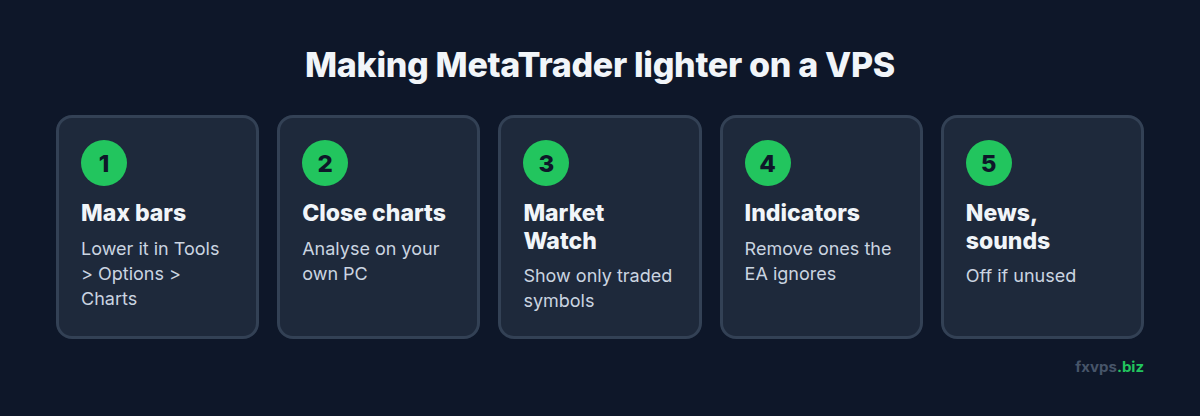
The biggest savings come from settings, not from the EA:
- Reduce Max bars in chart. In Tools > Options > Charts, lower “Max bars in chart” to what your indicators actually need. Many strategies need a few thousand bars, not the default. Restart the terminal for it to take effect.
- Close charts you only look at. Every open chart costs memory, even without an EA. Do your analysis on your own computer and keep the VPS for trading.
- Hide unused symbols in Market Watch. Right-click Market Watch and choose Hide All, then show only the symbols you trade. Less data flows in, and the terminal has less to process.
- Remove indicators the EA does not use. Indicators on the chart recalculate on every tick even if the EA never reads them.
- Turn off news and sounds in the terminal options if you do not use them.
💡 Tip: Open Task Manager before and after a change, and compare the terminal’s memory. It is the quickest way to see what each change is worth on your setup. Our guide to how much RAM a forex VPS needs explains what normal looks like.
✅ Best Practice: Whichever setup you use, give every EA instance its own magic number, and keep a note of which chart or symbol list it covers. See magic numbers and running several EAs on one account.
Recommended FXVPS Plan
- Core ($29/mo, 2GB RAM, 1 vCPU): a multi-symbol EA, or a few charts with EAs, in one or two terminals.
- Pro ($39/mo, 4GB RAM, 2 vCPU): a chart per pair across many pairs, or several terminals. The second core helps during news, when many EAs wake up together.
- Scaling ($79/mo, 8GB RAM, 4 vCPU): many terminals each with many charts, or MT5 multi-symbol optimisation in the Strategy Tester alongside live trading.
See how many MT4 terminals you can run for more detail, compare plans on the pricing page, or try your exact setup for 7 days with the $2.99 trial.
Frequently Asked Questions
Does an EA on a EURUSD chart receive ticks from other pairs?
Not as tick events. Its tick handler only fires for EURUSD. It can still read other pairs’ prices whenever it runs, which is how multi-symbol EAs work, usually with a timer.
Is a multi-symbol EA faster than one chart per pair?
It uses less memory, but it is usually slower to react to non-chart symbols, because it checks them on a timer instead of on every tick. One chart per pair reacts fastest.
How many charts can I run on a VPS?
It depends mostly on RAM and on how many bars each chart keeps. Lowering “Max bars in chart” and closing unused charts lets the same plan carry many more.
Can I backtest a multi-symbol EA in MT4?
Not reliably. The MT4 Strategy Tester models only the chart symbol properly. MT5’s Strategy Tester supports multi-symbol testing.
Why did my multi-symbol EA stop trading one pair?
Common causes are the symbol being hidden from Market Watch, a changed symbol name or suffix, or the market for that symbol being closed. Check the Experts tab for messages from the EA.