

You set up your EA on a new VPS, watched it connect, and felt good about it. Then the next morning you open your account and find two trades where there should be one. Or a trailing stop that keeps jumping back and forth. Or a position closed by “something” you did not expect.
Nine times out of ten the cause is simple: the EA is still running on your home computer as well. Two terminals, logged in to the same account, each with its own copy of the EA, both trading.
This post explains why MetaTrader lets this happen, what it does to your account, and the clean way to move an EA to the VPS so only one copy is ever in charge.
Why MetaTrader Allows Two Copies at Once
Most brokers let you log in to the same MT4 or MT5 account from more than one place at the same time. That is a feature: it is why you can watch your account on the mobile app while the desktop terminal is open, or check it from a laptop while travelling.
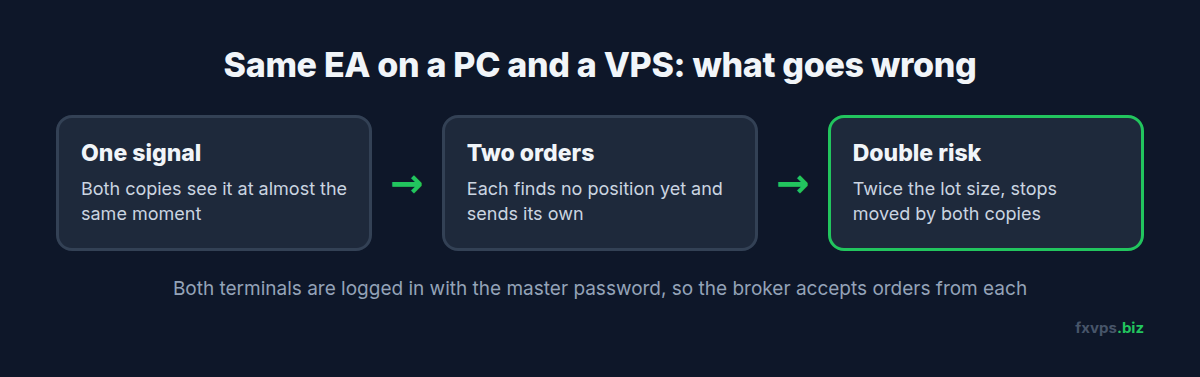
The broker’s server does not know or care that one of those terminals is running an EA. It just accepts valid orders from any terminal logged in with the master password.
So when you install MT5 on your VPS, log in, and attach your EA, nothing switches off the copy on your PC. If your PC is still on, still logged in, and still has AutoTrading (MT4) or Algo Trading (MT5) enabled, you now have two EAs managing one account.
📊 Key Stat: The broker’s server treats every terminal logged in with the master password as allowed to trade. Two terminals with the same EA attached means two independent decision makers on one account.
What Two Copies Actually Do to Your Account
It is tempting to think a well written EA would notice the other copy’s trades and hold back. Some do, some of the time. Here is what usually goes wrong.
Double Entries
Both copies see the same signal at almost the same moment. Each checks whether it already has a position, finds none, and sends an order. By the time either one sees the other’s trade, both orders are already filled. You end up with twice the intended position size, and twice the risk.
The VPS is usually faster, because it sits close to the broker’s server, so it often fills first. But the home copy is not far behind, and a few hundred milliseconds is plenty of time for both to fire.
Fighting Over Stops
Trailing stops and breakeven logic are the classic tell. The VPS copy moves the stop loss. The home copy, using slightly different prices or a slightly different tick, moves it again. In the journal you see a stream of modifications on the same ticket, sometimes in opposite directions.
Unexpected Closes
If both copies manage the same magic number, either one can close a trade the other opened. An EA that closes positions at a set hour or on an opposite signal may close trades early, or close a hedge you meant to keep. See magic numbers and running several EAs on one account for how EAs identify their own trades.
Confusing Results
Even when nothing visibly breaks, your results stop matching anything. The backtest assumed one position at a time. The account now shows more trades, more commission and different drawdown. You can spend days blaming the EA, the broker or the VPS when the real cause is a second copy at home.
⚠️ Warning: Prop firm accounts are a particular risk. A doubled position can push an account through its daily loss limit in one move. Check positions and lot sizes in the first hours after moving an EA to a VPS.
How to Tell if You Have Two Copies Running
Look for any of these signs:
- Pairs of trades opened within a second or two of each other, same symbol, same direction, same lot size.
- Repeated modifications of the same order in the Journal or Experts tab.
- Trades you do not see in the VPS terminal’s Experts log. If the VPS log has no record of opening a trade that exists in your account, something else opened it.
- Your home PC is on. It sounds obvious, but if you left it on overnight with MetaTrader open, assume the EA is running there.
The Experts tab in each terminal shows what that copy of the EA did. Comparing the two logs side by side usually settles the question in a minute. See reading MT4 and MT5 log files on your VPS.
The Clean Way to Move an EA to Your VPS
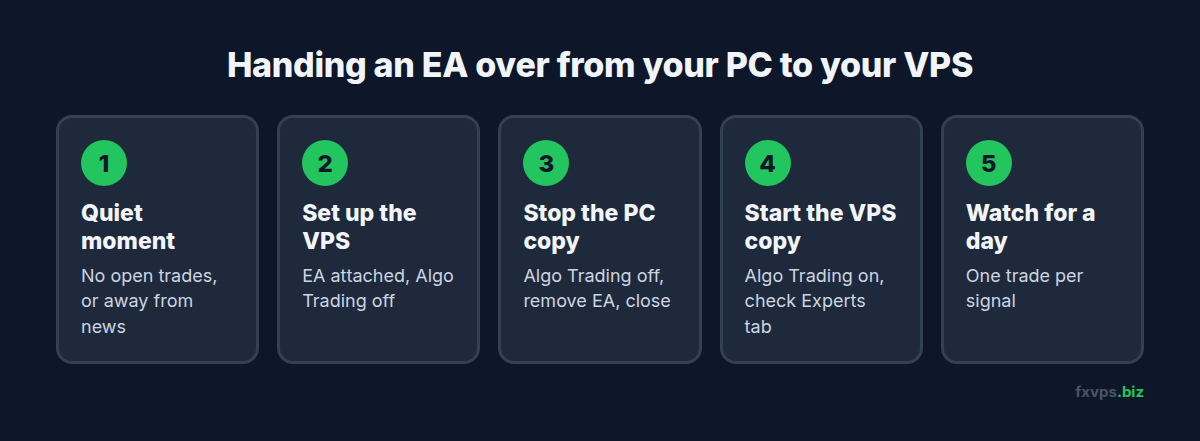
The goal is a short, clear handover, with only one copy in charge at any moment.
- Pick a quiet moment. Ideally with no open trades from the EA, or at least away from news and the daily rollover. A weekend is easiest.
- Set up the VPS terminal first, without the EA running. Install the platform, log in, copy the EA and its set file across, and attach it to the chart with Algo Trading still switched off. See EA set files and presets on a VPS.
- Switch off trading at home. On the PC, click AutoTrading (MT4) or Algo Trading (MT5) so it is off. Better still, remove the EA from its chart. Then close the terminal.
- Switch on trading on the VPS. Turn on Algo Trading in the VPS terminal and check the smiley face (MT4) or the blue hat icon (MT5) on the chart shows the EA is active.
- Check the Experts tab on the VPS to confirm the EA initialised and is managing any existing positions.
- Watch the account for a day. Confirm you see one trade per signal.
💡 Tip: If the EA already has open trades, keep the same magic number and the same inputs on the VPS. The new copy will then recognise those trades as its own and carry on managing them. Changing the magic number leaves the old trades orphaned.
Keeping an Eye on Things From Home Without Trading
You do not have to give up watching your account from your PC. You just need that terminal to be unable to trade.
Log in with the investor password. The investor password gives read-only access. You see positions, balance and charts, but no terminal logged in this way can place or change orders, so an EA attached there cannot trade either. See investor password vs master password.
Or keep the PC terminal with no EAs attached and Algo Trading off. This works, but it relies on you never switching it back on by accident, for example when loading an old profile that still has the EA on a chart.
Or use the mobile app. The MT4 and MT5 apps do not run EAs, so they are a safe way to keep watch. See using the MT4 and MT5 mobile app with an EA on a VPS.
✅ Best Practice: Once the EA is live on the VPS, log your home terminal in with the investor password. It removes the risk of a second copy completely, even if you open an old profile with the EA attached.
Other Places a Second Copy Can Hide
The home PC is the usual culprit, but not the only one:
- An old VPS or a free broker VPS you used before and never cancelled or cleared. See free broker VPS vs paid forex VPS.
- MetaQuotes’ built-in hosting, if you migrated the EA there at some point. A migrated EA keeps running on that hosting until you stop it from the terminal.
- A second terminal on the same VPS, for example an extra MT5 install you used for testing that is still logged in to the live account. See running multiple MT4/MT5 terminals on a VPS.
- A standby VPS you set up for failover and switched on at the same time as the main one. See a standby backup VPS for EAs.
If you have ever run the EA anywhere else, make sure that place is switched off or logged in read-only.
Recommended FXVPS Plan
One EA on one account is light work, and the plan you need depends on how many terminals you run:
- Core ($29/mo, 2GB RAM, 1 vCPU): one or two terminals, ideal for moving a single EA off your PC.
- Pro ($39/mo, 4GB RAM, 2 vCPU): several terminals and EAs.
- Scaling ($79/mo, 8GB RAM, 4 vCPU): many accounts, or heavy EAs.
See the pricing page, or test the handover on the $2.99 7-day trial.
Why FXVPS for Moving Your EA Off Your PC
- 24/7 uptime, so you can switch the home PC off for good and stop worrying about it.
- Servers near your broker in London, New York, Tokyo, Hong Kong and over 15 locations.
- Your own Windows desktop, so the setup looks exactly like the terminal you already know.
- Room for a demo and a live terminal side by side when you want to test changes.
Frequently Asked Questions
Can I run the same EA on my PC and my VPS at the same time?
You can, but on the same account you almost never should. Both copies trade independently, which usually means double entries and conflicting changes to stops.
Will my EA know the other copy’s trades are not its own?
Not reliably. If both copies use the same magic number they treat each other’s trades as their own. Even when they check for open positions, both can send an order before either sees the other’s fill.
How do I watch my account from home without trading?
Log in with the investor password, or use the mobile app. Neither can place trades, so there is no risk of a second EA.
I switched off my PC. Is that enough?
If MetaTrader on the PC is closed, that copy cannot trade. Just remember to switch Algo Trading off or remove the EA before you next open it, or it will start trading again.
Does the VPS copy pick up my existing trades?
Yes, if you keep the same magic number and inputs. The EA will find positions with its magic number and carry on managing them.