

A buy stop you placed on Friday is gone on Monday. Or a sell limit from last month is still sitting there, long after the setup stopped making sense. Both come down to the same setting: the pending order’s expiration.
Expiration is easy to overlook because the default in both MT4 and MT5 is “never”. But EAs often set it, brokers sometimes restrict it, and MT5 adds a “Today” option that removes orders at the end of the day without asking. This post explains how it all works, and why it matters for anyone running pending order EAs on a VPS.
Pending Orders Live on the Broker’s Server
Start with the most useful fact: once a pending order is accepted, it lives on the broker’s trade server, not in your terminal.
That means a buy limit, sell limit, buy stop or sell stop will trigger at its price even if your terminal is closed and your VPS is off. Expiration works the same way. When the expiry time passes, the broker’s server deletes the order. Your terminal does not need to be running for that to happen.
What does need your terminal is anything the EA does after the order triggers or expires: trailing the stop, placing the next order in a grid, re-placing an expired order. See what stops working when your MT4 terminal goes offline.
📊 Key Stat: Pending orders and their expiry times are handled on the broker’s server. They trigger and expire whether or not your terminal is running.
Expiration in MT4
MT4 keeps it simple. In the order window, when you choose a pending order type, there is an Expiry box with a date and time field.
- Expiry unticked: the order stays until it triggers or you delete it. This is effectively Good Till Cancelled (GTC).
- Expiry ticked: the broker’s server deletes the order at the date and time you set, if it has not triggered.
EAs set expiry through the expiration parameter of OrderSend. A value of 0 means no expiry.
The time you enter is in broker server time, the same time shown in Market Watch and on your charts, not your local time or your VPS clock. An EA that calculates “expire in 4 hours” from the wrong clock can produce orders that expire too early, too late, or are already in the past. See broker server time vs your VPS clock.
When MT4 Rejects an Expiry
Some brokers do not allow pending order expiration at all, and some set a minimum time before expiry. In MT4 an order with an expiry the broker will not accept fails with error 147, “expirations are denied by broker”. The fix is to send the order with no expiry, and have the EA delete it itself when the time comes. See MT4 and MT5 trade error codes explained.
Expiration in MT5
MT5 gives you a Type list in the order window with up to four choices:
- GTC (Good Till Cancelled): the order stays until it triggers or you delete it.
- Today: the order is deleted at the end of the current trading day if it has not triggered.
- Specified: the order is deleted at the date and time you set.
- Specified day: the order is deleted at the end of the day you choose.
Which of these you actually see depends on the broker and the symbol. The broker decides which expiration types each symbol allows, and the terminal only offers the allowed ones. You can see what a symbol supports in its specification window. See the symbol specification window.
EAs set the type in the type_time field of the trade request, with expiration holding the time for the specified types. If the EA asks for a type the symbol does not allow, MT5 rejects the order, typically with the return code for an invalid expiration (10022).
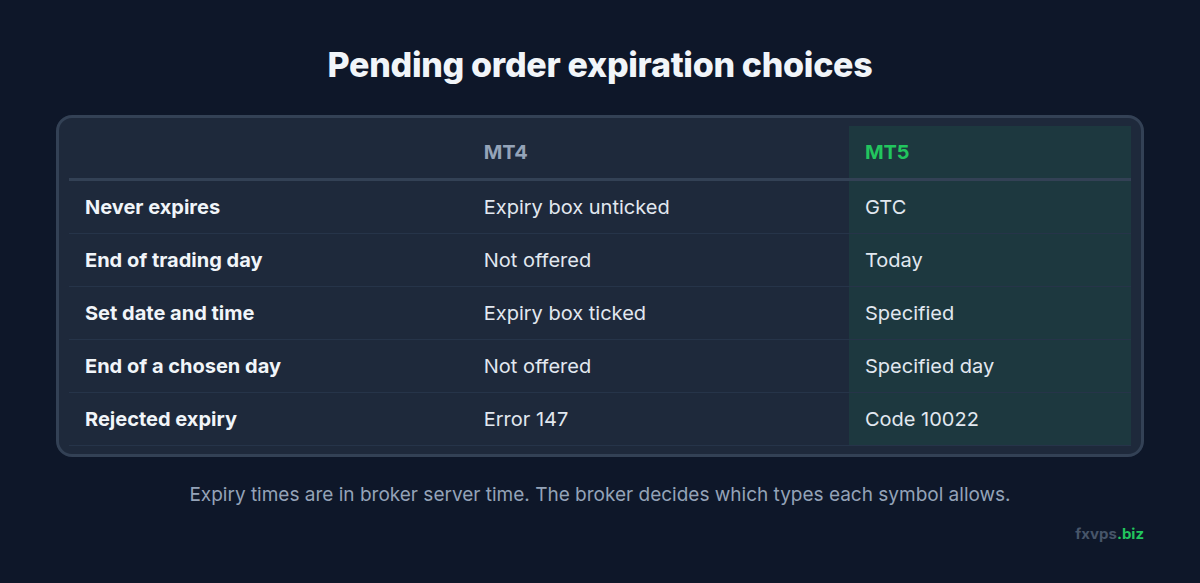
⚠️ Warning: “Today” orders are removed at the end of the trading day on the broker’s server. If your EA places pending orders with “Today” and expects to find them the next morning, they will be gone. An EA built for one broker’s default may behave differently at another broker that only allows some types.
Why This Matters for EAs on a VPS
Pending order EAs, such as breakout systems, news straddles and grids, depend on expiration more than most traders realise.
Breakout and Session EAs
An opening range breakout EA might place a buy stop and a sell stop at the session open and expect both to expire by the session close. If the broker rejects the expiry, the EA has to manage the clean up itself. If the terminal is closed when that time comes, the orders stay live into the next session. See the DAX opening range breakout study for the kind of strategy where this matters.
News Straddles
News EAs often place orders either side of the price a few minutes before a release and expire them shortly after. An expiry set on the server removes them even if your connection drops at the worst moment. An expiry managed by the EA depends on the terminal staying up. See news trading on a VPS.
Grids
Grid EAs place many pending orders. Some rely on the EA to delete and re-place them as price moves, others set expiry. Either way, orders left behind after the EA stops, or after you remove it from the chart, will still trigger. See grid and martingale EA VPS requirements.
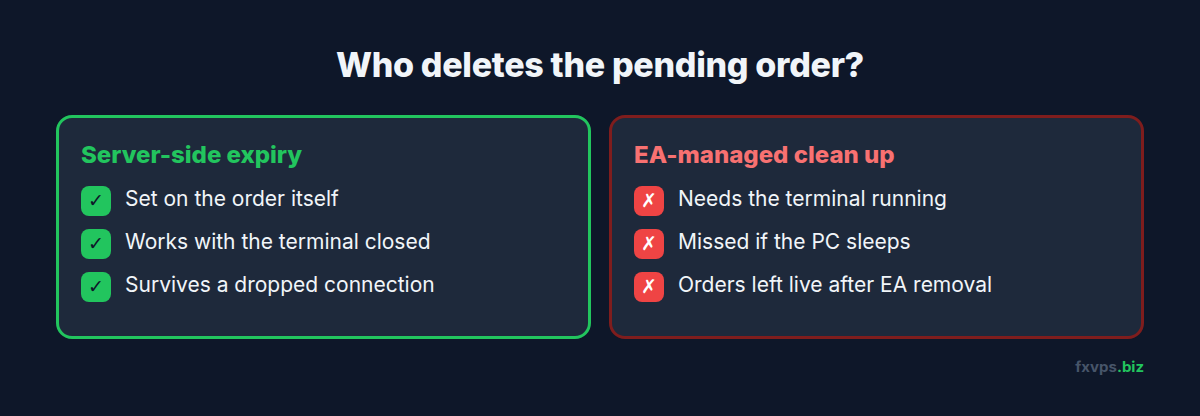
💡 Tip: If your EA deletes its own pending orders on a timer, it only works while the terminal is running. That is the best reason to run it on a VPS instead of a home PC that sleeps, restarts for updates or loses its connection.
Removing an EA Does Not Remove Its Orders
This catches people out regularly. When you remove an EA from a chart, close the terminal, or switch off Algo Trading, any pending orders it placed stay on the broker’s server. They can still trigger, and once they do, nothing is managing the resulting position.
Before you stop a pending order EA:
- Open the Trade tab and look for pending orders with the EA’s comment or magic number.
- Decide whether to leave them, or delete them manually (right-click, Delete Order).
- Check again after the EA is removed, in case it placed one more order as it shut down.
✅ Best Practice: When you move an EA to a new VPS or a new broker, list its pending orders first. Delete them or make sure the new copy will recognise them by magic number, so nothing triggers without an EA to manage it. See magic numbers and running several EAs on one account.
Weekends, Holidays and Gaps
Pending orders do not expire just because the market closes. A GTC order placed on Friday is still there on Monday, and if the market opens beyond its price, it triggers at the first available price, which may be well past where you placed it. Stop orders in particular can fill with slippage after a gap.
If you do not want orders carrying over the weekend, either give them an expiry before the Friday close, or have your EA delete them. See the weekend gap and Sunday rollover guide and the holiday trading checklist for EAs.
Quick Troubleshooting
“My pending order disappeared.” Check the History tab (MT4: Account History, MT5: History, with Orders view). An expired order is listed there as cancelled or expired. If it says expired, the expiry was set, perhaps by the EA. In MT5, check whether it was a “Today” order.
“My order was rejected with an expiration error.” The broker does not allow that expiry for the symbol. Try GTC, or the types listed in the symbol specification, and let the EA handle the timing.
“My EA’s orders expire at the wrong time.” The EA is probably calculating the expiry from local or VPS time instead of server time. Check its settings for a time offset input.
“Orders keep triggering after I removed the EA.” The pending orders were left on the server. Delete them from the Trade tab.
Recommended FXVPS Plan
Pending order EAs are usually light on resources. What they need most is a terminal that stays running so their timing works:
- Core ($29/mo, 2GB RAM, 1 vCPU): one or two terminals running breakout or news EAs.
- Pro ($39/mo, 4GB RAM, 2 vCPU): several terminals, or grid EAs with many open orders.
- Scaling ($79/mo, 8GB RAM, 4 vCPU): many accounts and EAs.
See the pricing page, or try it on the $2.99 7-day trial.
Why FXVPS for Pending Order EAs
- 24/7 uptime, so EA-managed clean up and re-placement happen on time.
- Servers near your broker in London, New York, Tokyo, Hong Kong and over 15 locations, so modifications and deletions reach the server fast.
- Your own Windows desktop for MT4, MT5 or cTrader.
- No sleep, no home Wi-Fi drop-outs in the middle of a news straddle.
Frequently Asked Questions
Do pending orders trigger if my terminal is closed?
Yes. Pending orders are held on the broker’s server and trigger at their price whether or not your terminal or VPS is running.
What does GTC mean?
Good Till Cancelled. The order stays until it triggers or you delete it. In MT4 an order with the Expiry box unticked behaves the same way.
What is a “Today” order in MT5?
An order that the broker’s server deletes at the end of the current trading day if it has not triggered.
Why can I not set an expiry on my pending order?
Your broker may not allow expiration for that symbol, or may require a minimum time. Use GTC and delete the order yourself, or let your EA manage it.
What time zone is the expiry in?
Broker server time, the time shown in Market Watch, not your local time or your VPS clock.