

Your EA tries to open a trade with a tight stop loss, and the Experts tab fills with “invalid stops”. Or a trailing stop that works fine most of the time suddenly refuses to move when price gets close. Or the EA cannot close or delete an order near the market, and nothing in its settings explains why.
These are broker limits, not VPS problems. Many brokers set a minimum distance between the current price and any stop loss, take profit or pending order (the stop level), and a zone near the market where orders cannot be changed (the freeze level). This post explains both, where to find them, and how EAs should handle them.
The Stop Level
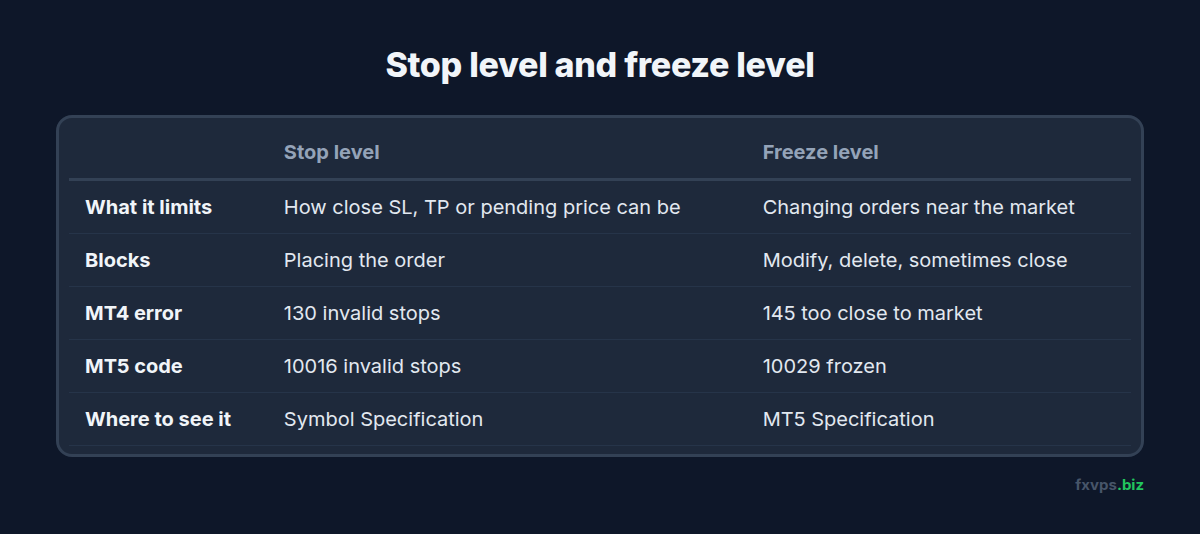
The stop level is the minimum distance, in points, between the current market price and:
- the stop loss and take profit of an order, and
- the open price of a pending order.
If an EA sends a stop loss closer than this distance, the broker rejects the request. In MT4 that is error 130, “invalid stops”. In MT5 it is the return code for invalid stops (10016).
Which price the distance is measured from matters. For a buy position, the stop loss and take profit are checked against the Bid, because that is the price a buy closes at. For a sell, they are checked against the Ask. An EA that measures from the wrong side can be out by the spread, which is enough to cause rejections in fast markets.
📊 Key Stat: A stop level of 50 points on a 5-digit forex pair means 5 pips. Any stop loss, take profit or pending order closer than that to the current price is rejected.
The Freeze Level
The freeze level is a zone around the current price inside which an order is frozen. When the price is within the freeze level of an order’s stop loss, take profit or pending price, the broker will not let you:
- modify that order (for example, move its stop loss),
- delete a pending order, or
- in some cases, close the position manually, if its stop loss or take profit is within the zone.
In MT4, trying to modify an order that is too close to the market gives error 145, “modification denied because order is too close to market”. MT5 rejects it with the return code for a frozen order (10029).
The freeze level is why a trailing stop can stall just as price approaches its level. It is the broker protecting itself from orders being changed at the last moment before they trigger.
⚠️ Warning: Many brokers set both levels to zero on most symbols, which means no fixed minimum. But some use zero to mean the limit floats with the spread, so a zero is not a guarantee you can place a stop right next to the price. If an EA gets invalid stops errors with a zero stop level, ask your broker how they treat it.
Where to Find Them
In the terminal: open Market Watch, right-click the symbol, choose Specification. The window lists the Stops level in points. In MT5 it also shows the Freeze level. See the symbol specification window.
In an EA: MT4 uses MarketInfo(Symbol(), MODE_STOPLEVEL) and MarketInfo(Symbol(), MODE_FREEZELEVEL). MT5 uses SymbolInfoInteger with SYMBOL_TRADE_STOPS_LEVEL and SYMBOL_TRADE_FREEZE_LEVEL. Both return points.
Remember that levels can differ between symbols, between account types and between brokers. An EA tuned on one broker’s raw account may meet different limits on another broker’s standard account. See handling broker differences.
When These Limits Bite
Tight Stops and Scalping EAs
A scalping EA that uses a 3 pip stop loss works on a broker with no stop level and fails on one with a 5 pip stop level. If you move a scalper between brokers, check the stop level first. See the best forex VPS for scalping.
Pending Orders Close to Price
Breakout EAs that place a buy stop a few points above the current price will be rejected if that is inside the stop level. Some EAs adjust the price outward automatically. Others simply fail and log the error.
Trailing Stops and Breakeven
A trailing stop that tries to follow price very closely can fall foul of the stop level (too close to price) and the freeze level (price too close to the current stop). The EA’s log shows a string of modification errors. See trailing stops need the terminal running.
News and Wide Spreads
When spreads widen around news or the daily rollover, the Bid and Ask move apart. A stop that was valid against one price may now be too close to the other. Some brokers also widen their stop or freeze levels at these times. See daily rollover and spread widening for EAs.
How a Well-Behaved EA Handles Them
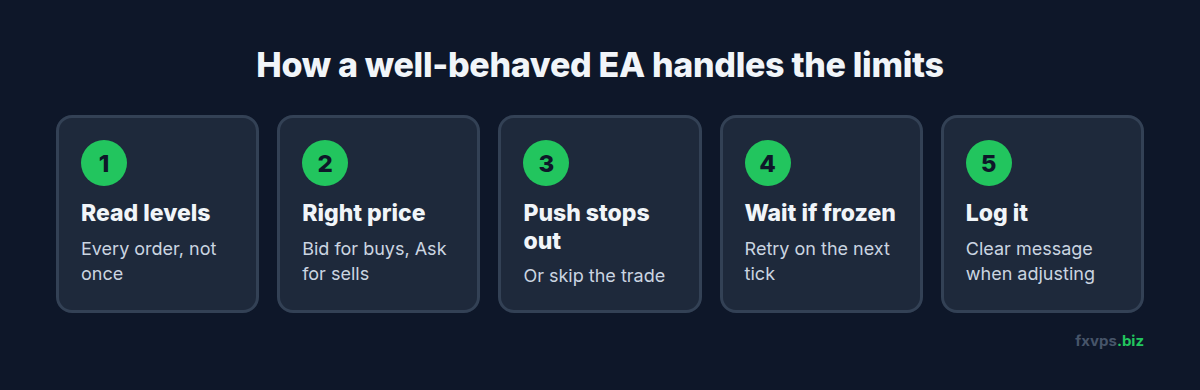
A properly written EA reads the stop and freeze levels before every order or modification and adjusts:
- Reads the levels for the symbol it is trading, every time, not once at start up.
- Measures from the right price: Bid for buy stops and targets, Ask for sell.
- Pushes stops outward to the minimum distance, or skips the trade, if its planned stop is too tight.
- Skips modifications while price is inside the freeze level, and tries again on the next tick.
- Logs a clear message when it adjusts or skips, so you can see what happened.
If your EA does not do this and you cannot change the code, look for inputs that set a minimum stop distance or a trailing step. Setting them above the broker’s stop level often stops the errors.
💡 Tip: Some EAs place trades without a stop loss and add it a moment later, or keep stops hidden in the EA. That avoids the stop level on entry but brings its own risks if the terminal goes offline. See virtual stop loss and hidden SL/TP EAs on a VPS.
Does a VPS Help?
A VPS does not change the broker’s stop or freeze levels. Those are set on the broker’s server.
What a VPS near your broker does change is the time between your EA deciding on a price and the order arriving. Price moves less in that time, so a stop that was just outside the stop level when the EA calculated it is more likely to still be outside when the broker checks it. On a slow home connection, fast markets turn more borderline orders into rejections. See slippage, requotes and VPS latency.
✅ Best Practice: Before you go live with an EA on a new broker, open the specification for each symbol it trades and write down the stop level and freeze level. Compare them with the EA’s tightest stop loss, take profit, pending order distance and trailing step. If any are smaller, fix the inputs first.
Recommended FXVPS Plan
Stop and freeze levels do not change your resource needs. Choose by the number of terminals and EAs:
- Core ($29/mo, 2GB RAM, 1 vCPU): one or two terminals.
- Pro ($39/mo, 4GB RAM, 2 vCPU): several terminals, or a scalper and a demo running side by side.
- Scaling ($79/mo, 8GB RAM, 4 vCPU): many accounts and EAs.
See the pricing page, or try it on the $2.99 7-day trial.
Why FXVPS for Tight-Stop EAs
- Servers near your broker in London, New York, Tokyo, Hong Kong and over 15 locations, so prices change less between calculation and execution.
- 24/7 uptime, so trailing stops and breakeven logic keep working.
- Your own Windows desktop for MT4, MT5 or cTrader, with full access to logs.
- Room for demo and live terminals to test a new broker’s limits before risking money.
Frequently Asked Questions
What does “invalid stops” mean in MT4 or MT5?
The stop loss, take profit or pending price is too close to the current market price, closer than the broker’s stop level, or on the wrong side of the price.
What is the freeze level?
A zone around the current price inside which the broker will not let you modify or delete an order. It stops orders being changed at the last moment before they trigger.
Where do I find the stop level?
In the symbol’s specification window in Market Watch, listed as Stops level in points. An EA can read it with MarketInfo in MT4 or SymbolInfoInteger in MT5.
Why does my trailing stop stop moving near the price?
Probably the freeze level. While price is within that distance of the stop, the broker rejects modifications.
Will a VPS remove the stop level?
No. The stop level is set by the broker. A VPS near the broker reduces how far price moves while your order is on its way, which reduces borderline rejections.