

You bought a popular grid EA, set it up on your VPS against your US broker account, and switched it on. The first trade opened. The second, a hedge in the opposite direction, did not. The Journal shows a rejected order, and the EA is now stuck waiting for a position that will never exist.
If you trade forex through a US broker, your account works under rules that many EAs were never designed for. The best known is FIFO: first in, first out. This post explains what the rule means in practice, which EA behaviours clash with it, and how to check an EA before you trust it with a US account.
What the FIFO Rule Is
In the United States, retail forex dealers are members of the National Futures Association (NFA). NFA Compliance Rule 2-43(b), in force since 2009, requires dealers to offset customer positions on a first-in, first-out basis. In practice that means:
- No hedging. You cannot hold a long and a short position in the same currency pair in the same account at the same time.
- Oldest first. If you hold several positions of the same size in the same pair, the oldest one must be closed first.
- Orders that break the rule are rejected. Brokers are required to refuse them.
The rule applies per account. It is enforced by your broker, not by MetaTrader or your VPS.
📊 Key Stat: FIFO applies to positions in the same pair, in the same account. Positions in different pairs, or in a separate account, are not affected by each other.
Who It Applies To
FIFO applies to retail forex accounts with US-regulated dealers. If you are not sure whether your account is covered, ask your broker. They will know exactly how they apply the rule, including any detail on position sizes and partial closes.
This post describes the rule as brokers and the NFA’s members have explained it. It is not legal advice, and your broker’s terms are the final word for your account.
EA Behaviours That Clash With FIFO
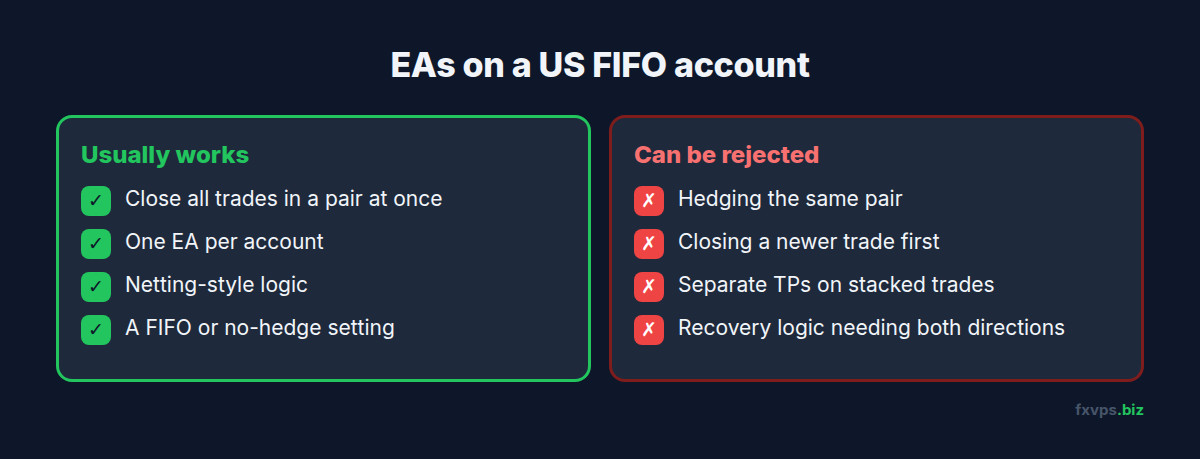
Many EAs are written for brokers outside the US, where hedging and closing trades in any order are normal. These behaviours can fail on a FIFO account:
- Hedging: opening a sell while a buy in the same pair is open. The order is rejected.
- Grids and baskets that close the best trade first: closing a newer profitable position while an older same-size position is still open breaks FIFO.
- Individual take profits on stacked trades: if a newer trade’s take profit is hit before an older same-size trade, the close can be refused.
- Recovery and martingale logic that relies on holding both directions.
- Partial closes that do not start with the oldest position.
When an order is rejected, a well-written EA logs it and adapts. A poorly written one may retry endlessly, freeze, or lose track of what it holds.
⚠️ Warning: A FIFO rejection can leave an EA with a different set of positions from the one it planned. If the EA does not handle it, your risk may be higher than its settings suggest. Never run an untested EA on a live US account.
Netting Accounts and MT5
MetaTrader 5 has a netting account mode in which a symbol only ever has one position: a new order in the opposite direction reduces or reverses it. Netting cannot hedge by design, which fits the US no-hedging rule. See MT5 hedging vs netting accounts for EAs.
Whether your account is hedging or netting is set by your broker. In MT5, the account type is shown in the terminal. Check it before attaching any EA, because an EA written for a hedging account can behave very differently on a netting one.
How to Check an EA Before Going Live
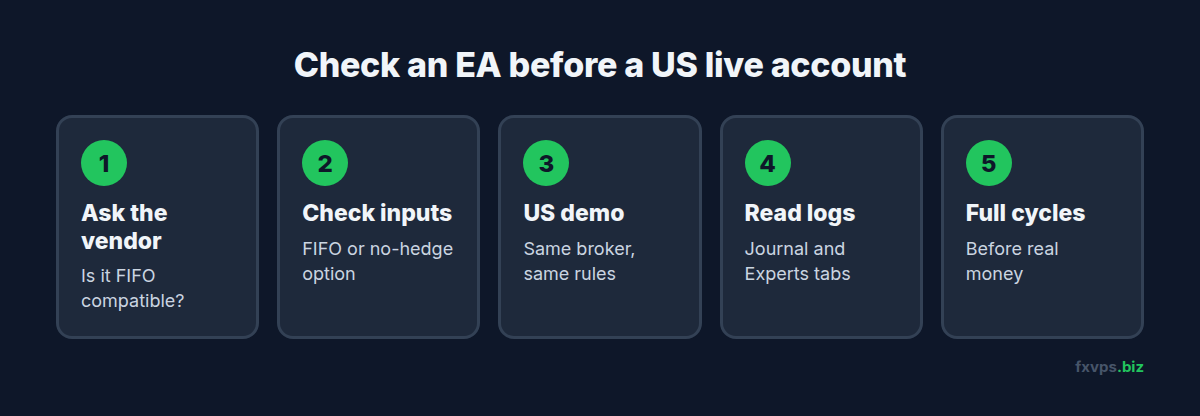
- Ask the vendor whether the EA is FIFO compatible. Many vendors have a FIFO option or a separate US version.
- Look for a FIFO or no-hedge setting in the EA’s inputs.
- Run it on a demo account with the same US broker, since demo accounts at US brokers usually apply the same rules.
- Watch the Journal and Experts tabs for rejected orders, and the EA’s behaviour after each one. See MT4 and MT5 trade error codes explained.
- Keep it on demo through several full cycles of its logic, including a grid or basket closing, before trusting it with real money.
For a broader process, see forward testing an EA on a VPS: demo to live.
💡 Tip: If the EA has a “close all” basket exit, that usually works on FIFO accounts, because closing every position in the pair never leaves an older one open. Individual exits on stacked trades are the risky part.
Workarounds Traders Use, and Their Limits
You will see these suggested on forums and by some brokers. Each has trade-offs:
- Separate accounts per strategy. Because FIFO applies per account, two EAs on the same pair in different accounts do not interfere. Many US brokers offer sub-accounts. This is the cleanest option.
- Slightly different lot sizes for stacked trades, such as 1.00 and 1.01. Some explanations of FIFO apply it to same-size positions, so this can let an EA close trades in its own order. It adds complexity, and you should confirm with your broker how they treat different sizes.
- Trading correlated pairs instead of hedging the same pair. This changes the strategy’s risk, so it is not a like-for-like replacement.
✅ Best Practice: Run one EA per account on a US broker where possible. It removes most FIFO conflicts, keeps each EA’s statistics separate, and makes rejected orders far easier to trace.
Reading the Journal After a Rejection
When a FIFO conflict happens, the terminal’s Journal and the EA’s Experts tab are where the evidence is. Note the time, the symbol, the order type and the message the broker returned. Then look at what the EA did next: did it retry, give up, or open something else? That sequence tells you whether the EA handles FIFO sensibly or needs a different setting. If the message is unclear, send the exact Journal lines to the broker and ask what rule the order broke. See reading MT4 and MT5 log files on a VPS.
Does a VPS Change Anything?
No. FIFO is applied by your broker on their server. A VPS in any location, on any plan, sends exactly the same orders as your home PC would.
What a VPS does give you is a stable place to forward test an EA on a US demo account around the clock, so you see how it handles rejections at 3am, not just while you are watching. US forex brokers commonly host their servers in New York, so pick a location close to your broker’s server. See how to extract the IP or DNS address of your broker’s MT4 server and tips for choosing the best VPS location.
Recommended FXVPS Plan
If you split strategies across several accounts, you will run more terminals:
- Core ($29/mo, 2GB RAM, 1 vCPU): one or two terminals.
- Pro ($39/mo, 4GB RAM, 2 vCPU): several terminals, one per account or sub-account.
- Scaling ($79/mo, 8GB RAM, 4 vCPU): many terminals and accounts.
See the pricing page, or forward test on the $2.99 7-day trial.
Why FXVPS for US EA Traders
- New York and other locations so you can sit close to your broker’s servers.
- Run a terminal per account for clean, FIFO-friendly setups.
- Dedicated resources for terminals that run around the clock.
- A full Windows desktop for MT4, MT5 and other platforms.
Frequently Asked Questions
What is the FIFO rule in forex?
It is NFA Compliance Rule 2-43(b), which requires US retail forex dealers to close customer positions in the same pair on a first-in, first-out basis. It also means you cannot hedge the same pair in one account.
Why did my EA’s hedge order get rejected?
Your account is probably with a US broker, where holding opposite positions in the same pair is not allowed.
Does FIFO apply across different accounts?
No. It applies to positions in the same pair within the same account.
Is an MT5 netting account FIFO compatible?
Netting cannot hold opposite positions in a symbol, which suits the no-hedging rule. Ask your broker how they apply FIFO to your specific account.
Can a VPS help me get around FIFO?
No. The rule is applied by your broker. A VPS only keeps your EA running so you can test and run it reliably.