

Choosing a VPS location is simple when you have one broker: find out where its trade server lives and put the VPS next to it. The advice stops being simple the day you open a second account somewhere else.
It happens to most active traders sooner or later. A forex broker with servers in London and a prop firm whose servers are in New York. A main account in London and a second broker in Tokyo for the Asian session. A copier that takes signals from one and executes on the other. A VPS exists in exactly one building, so one of those connections is going to cross an ocean.
This guide gives you a way to decide which one, and how to tell when the right answer is two smaller servers instead of one.
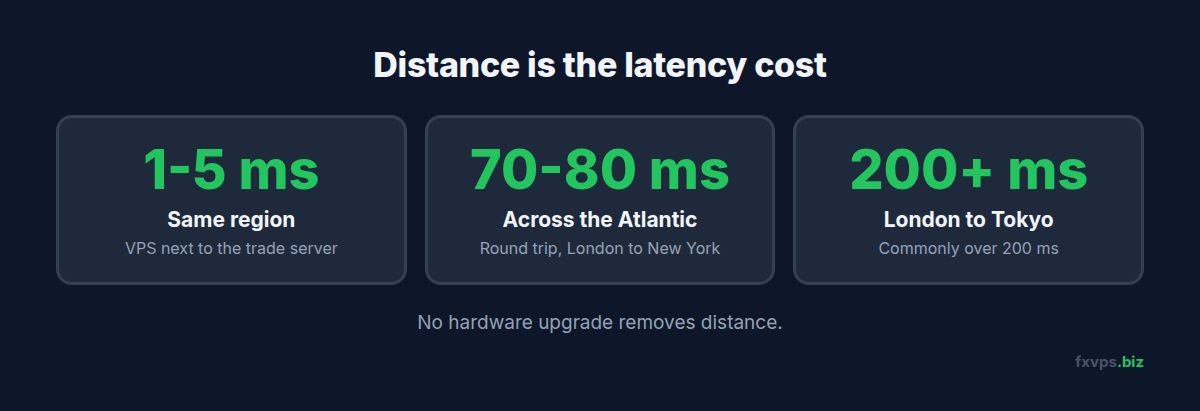
📊 Key Stat: A VPS in the same datacenter region as a broker’s trade server typically reaches it in 1-5ms. The same VPS reaching a server on the other side of the Atlantic takes roughly 70-80ms for the round trip, and London to Tokyo is commonly over 200ms. Distance is the one latency cost that no hardware upgrade removes.
Why You Cannot Split the Difference
A tempting idea is to pick a location “in the middle”. It does not work, for two reasons.
First, there is rarely a useful middle. Between London and New York is the Atlantic. Financial datacenters cluster in a handful of metros, and the main retail forex ones are London, New York, Tokyo, Hong Kong, and a few others.
Second, a midpoint gives you two mediocre connections instead of one excellent one and one slow one. Latency to a broker in the same metro is small because the traffic never leaves the local network. The moment you are outside that metro you are paying for long-haul distance either way. Our article on what “London server” really means explains why same-building and same-city are already different things.
So the real choice is binary for each broker: next to it, or far from it.
Step 1: Find Out Where Each Broker Really Is
Do not rely on where the broker’s head office is. An Australian broker frequently runs its trade servers in London or New York, and one broker can have different servers in different regions.
Check from the terminal itself:
- In MT4, click the connection status bars in the bottom-right corner to see the list of data centers and their ping times.
- In MT5, do the same to see access points.
Our guide to MT4 data centers, MT5 access points, and terminal ping explains how to read those numbers, and how to extract your broker’s server IP address shows how to test the route directly. Write down the location for each account before going further.
If both turn out to be in the same metro, you are done: one VPS there serves both.
Step 2: Rank Each Account by How Much Latency Costs It
Latency does not cost every strategy the same amount. Go through each account and ask what happens to its results if every order takes an extra 75ms to arrive.
Highly Sensitive
- Scalping EAs with targets of a few pips
- News and breakout strategies that enter with market orders during fast moves
- Any strategy on a raw-spread account where slippage is a large share of the edge
For these, an extra 75ms means the price has often moved before your order lands. See slippage, requotes, and VPS latency and scalping and high-frequency trading on VPS.
Moderately Sensitive
- Intraday EAs trading from M15 or H1 signals with market orders
- Grid and martingale systems, which place many orders and feel slippage in aggregate
- Trailing stops managed by the EA rather than the broker
Barely Sensitive
- Swing strategies holding for hours or days
- Strategies that enter with pending limit orders resting on the broker’s server
- Manual trading on higher timeframes
A limit order is already sitting at the broker. Your latency only affects how quickly you can place, move, or cancel it, not the fill itself.
💡 Tip: If you are unsure which group an EA belongs in, look at its average profit per trade in pips. If that number is under five, treat it as highly sensitive. If it is over thirty, a transatlantic connection will not change the outcome in any way you could measure.
Step 3: Apply the Decision Rules
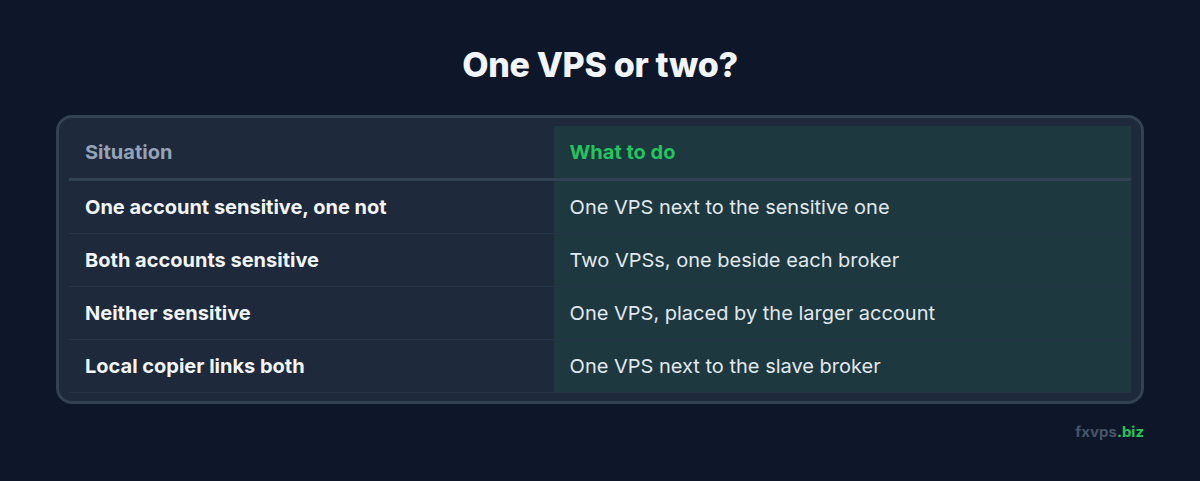
One Account Is Sensitive, the Other Is Not
Put the VPS next to the sensitive one. The swing account will run perfectly well over a 75ms link. This is the most common situation, and one VPS is the right answer.
Both Accounts Are Sensitive
This is the case for a second VPS. Two Core plans, one in each location, cost $58 a month combined. Compare that with what slippage costs you. On an account trading 20 standard lots a month, one tenth of a pip of extra slippage per trade is about $20 a month on its own. Active scalping accounts pass that level quickly.
Neither Account Is Sensitive
Use one VPS, placed by the larger account, or the location where you also want the lowest latency for manual intervention.
A Trade Copier Links the Two Accounts
This needs separate treatment, below.
The Trade Copier Case
A local trade copier reads trades from a master terminal and repeats them on a slave terminal. Most copiers that run “locally” need both terminals on the same Windows machine, because they pass trades through shared memory or files. That forces a single VPS, and the question becomes where to put it.
The copier’s total delay is the sum of two legs:
- Master leg: the time for the master terminal to learn about a new trade from the master broker’s server.
- Slave leg: the time for the slave terminal’s order to reach the slave broker’s server.
Whichever broker the VPS is far from, that leg carries the long-haul delay, so the total is about the same either way. What differs is which price is stale. The usual advice, and ours, is to place the VPS next to the slave account’s broker. The slave is where real orders are being filled, so that is where a tight, low-jitter connection reduces slippage and rejected orders. The master leg only carries a notification.
If the copier is internet-based, with separate sender and receiver programs talking through a cloud relay, the two terminals can live on two different VPSs, each beside its own broker. That gives both legs a short path, at the cost of the relay’s own delay. See copy trading setup on VPS for the architectures.
⚠️ Warning: Some prop firms restrict copying between accounts or require all activity on an account to come from a consistent IP address. Check the rules before building a cross-broker copier that involves an evaluation or funded account. See multiple prop firm accounts on one VPS.
Forex Plus Futures: A Special Case
Traders who run forex CFDs and exchange-traded futures have a cleaner split. CME futures are matched in the Chicago area, and platforms such as NinjaTrader connect through data feeds with their own gateways. A forex broker in London and a futures prop account are two different worlds, and each benefits from its own location. Our article on why Chicago matters for futures traders covers that side.
When One Bigger VPS Beats Two Small Ones
Location is not the only factor. Two servers also mean:
- Two Windows installs to keep updated
- Two sets of terminals to monitor
- Two places for something to be misconfigured
If both brokers are in the same metro, or only one account is latency-sensitive, one larger VPS is simpler and cheaper. A Pro plan at $39/mo with 4GB RAM and 2 vCPUs runs several terminals comfortably. See running multiple MT4 and MT5 terminals on VPS.
Two servers do give you one extra benefit beyond latency: independence. A problem on one does not touch the other, which matters if you use one as a fallback. Our guide to standby backup VPSs for Expert Advisors covers that design.
Test Before You Commit
You do not have to decide on theory. Latency is measurable.
- Start with one VPS next to the account you believe is most sensitive.
- Install both brokers’ terminals and note the ping each one reports.
- Run both accounts for a week and record slippage on market orders for each.
- If the far account’s slippage is hurting, trial a second VPS in its location and compare the same EA’s fills.
If you later decide the first location was wrong, the VPS can be relocated. See moving your trading VPS to a different location.
✅ Best Practice: Record ping and average slippage per account for the first two weeks after any location decision. The numbers settle the question far better than a debate about milliseconds, and they give you a baseline to spot later problems. See forex VPS performance metrics for what to track.
🚀 Try FXVPS for $2.99. Measure the real ping from London, New York, Tokyo, or Hong Kong to each of your brokers on a 7-day Core VPS trial before you choose.
Recommended FXVPS Setups
One location, both brokers nearby or one account insensitive: Pro Plan ($39/mo, 4GB RAM, 2 vCPUs) for two to four terminals.
Two locations, both accounts latency-sensitive: two Core Plans ($29/mo each, 2GB RAM, 1 vCPU), one beside each broker.
Copier with several slave accounts at one broker: Scaling Plan ($79/mo, 8GB RAM, 4 vCPUs) beside the slave broker.
FXVPS offers London, New York, Tokyo, Hong Kong, and other locations. Full plan details are at /pricing/.
Frequently Asked Questions
Can one VPS be in two locations?
No. A VPS runs on physical hardware in one datacenter. To be close to two distant brokers you need two servers.
Is 75ms of latency really a problem?
For a swing trader, no. For a scalper taking a few pips per trade with market orders, yes, because price moves during that time and you pay for it in slippage on every entry and exit.
Where should the VPS go for a trade copier?
Next to the slave account’s broker in most cases, because that is where orders are being filled. The master side only needs to report that a trade happened.
Will a faster CPU make up for a distant location?
No. CPU speed affects how quickly your EA processes a tick. It cannot shorten the time a signal takes to travel thousands of kilometres. See latency, jitter, and packet loss.
My broker has servers in both London and New York. Which do I use?
Your account is assigned to a specific trade server. Check the server name in your terminal and the access point list. Some brokers will move an account to a different server on request.
Related Reading
- Tips for Choosing the Best VPS Location for Trading — the single-broker version of this decision
- VPS Latency: What “London Server” Really Means — metro, campus, and building
- Equinix Data Centers Explained — where brokers cluster and why
- Trading From a High-Latency Region — when you, not your broker, are the distant one