

Every week, traders ask VPS providers the same question in slightly different words: “Which location do I need for my arbitrage EA?” The EA was usually bought from a site with an equity curve that goes up at 45 degrees and a video of a demo account doubling in an afternoon. The sales page says all you need is a fast VPS and a slow broker.
We sell fast VPSs, so it would be easy to say “London, here is the checkout link”. The honest answer is more useful. Latency arbitrage is a real technique with real mechanics, and understanding it will make you a better judge of execution. But as a retail business plan it fails for reasons that no VPS can solve, and it can cost you your profits, your account, or your prop firm challenge fee.
📊 Key Stat: A latency arbitrage EA needs the broker’s price to be stale by more than the total of your network latency, the broker’s order processing time, the spread, and the commission. On a modern broker bridge that window, when it exists at all, is measured in a few milliseconds.
How Latency Arbitrage Works
The strategy needs two price feeds:
- A fast feed, taken from a venue or broker whose prices update early. Vendors usually tell you to connect to a second account or a dedicated data feed.
- A slow broker, where you actually trade, whose quotes lag the fast feed by some small interval.
The EA watches both. When the fast feed jumps and the slow broker’s quote has not yet moved, the EA buys (or sells) at the slow broker’s old price, knowing where the price is about to be. A moment later the slow broker’s quote catches up and the EA closes for a small profit.
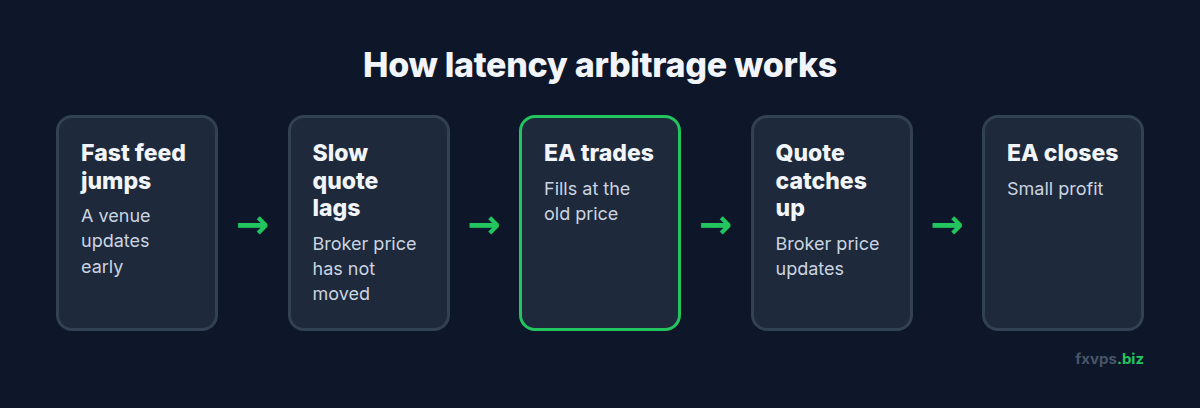
On paper there is no market risk, because you are not predicting anything. You are trading on a price that is already out of date. That is exactly why brokers treat it differently from every other strategy.
Why It Looks So Good on Demo
Demo servers fill every order instantly at the displayed price. There is no liquidity provider to reject the trade, no slippage, and often a slower price feed than the live server. An arbitrage EA on a demo account is trading against a simulator that never says no.
The videos are not necessarily faked. They are simply recordings of a test that tells you nothing about live execution. Our article on why backtests do not match live results covers the same gap for conventional EAs. For arbitrage, the gap is the whole strategy.
Why It Fails on a Live Account
You Are Trading Against Someone’s Stale Quote
When you hit a stale price, someone is on the other side: the broker itself, if it is making the market, or the broker’s liquidity provider. Either way, a counterparty is losing money on every one of your trades in a pattern that is trivial to detect. Trades that last seconds, cluster at moments of fast price movement, and win almost every time do not look like scalping. They look like what they are.
The Tools Built to Stop It Are Standard
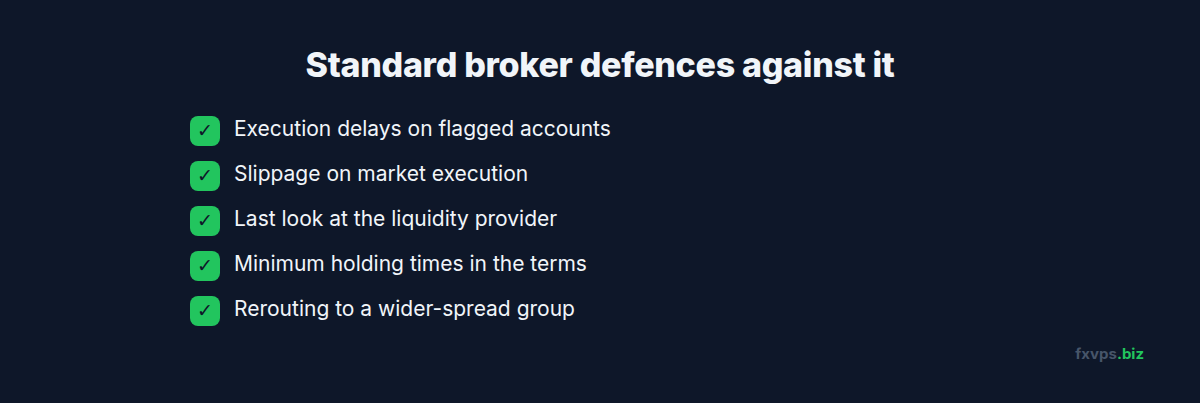
Brokers and liquidity providers have had years to respond, and the defences are ordinary features of bridge and risk software:
- Execution delays applied to accounts or order types flagged as toxic, so the order arrives after the price has updated.
- Slippage on market execution, which fills you at the current price rather than the stale one you saw. See market vs instant vs exchange execution.
- Last look at the liquidity provider, which allows a quote to be rejected if the market has moved.
- Minimum holding times in the terms of business.
- Rerouting the account to a different execution group with wider spreads.
Any one of these removes the edge. Most brokers have several available.
The Terms You Agreed To Forbid It
Almost every retail broker’s client agreement prohibits trading that exploits price latency, off-market quotes, or errors in the feed. The usual remedy is that the broker may cancel the affected trades and remove the profits. Traders who find a broker where the EA works for two weeks commonly find their gains reversed at withdrawal.
⚠️ Warning: Prop firms are stricter still. Latency arbitrage, tick scalping, and exploiting demo-feed inefficiencies appear on the prohibited list at essentially every retail prop firm, and most challenge accounts run in simulated environments where such strategies work unrealistically well. Passing a challenge this way typically ends with a denied payout and a closed account. Read our guide to prop firm rules and VPS compliance.
The Real Arbitrageurs Are Not Renting a Windows Terminal
Where genuine latency edges exist in institutional markets, they are contested by firms with co-located hardware, direct exchange connections, and engineering teams. A MetaTrader EA sits behind a terminal, a MetaTrader server, and a bridge. Even from a VPS in the same datacenter as the broker, you are several software layers slower than the participants who would take the same opportunity. Our article on high-frequency servers vs regular servers explains the gap.
”But the Vendor Says It Needs a Specific VPS”
Arbitrage EA vendors often insist on a particular VPS location, and they are right about one thing: the strategy is hypersensitive to latency. If your VPS is 30ms from the broker, the EA has no chance. If it is 1ms away, it has the theoretical chance described above.
What the location cannot do is change the broker’s behaviour. A fast VPS makes you the quickest person to arrive at a door the broker is entitled to close. When the EA stops working, the vendor will say your VPS or your broker is the problem and recommend a different one. This cycle can go on for as long as you keep paying.
💡 Tip: A quick test for any “risk-free” EA: ask the vendor for a verified track record on a live account, at a regulated broker, lasting more than six months, with withdrawals shown. Demo results, short live records, and unregulated brokers are the three conditions under which latency arbitrage appears to work.
What Low Latency Is Actually For
None of this means latency does not matter. It means latency is a cost to minimise, not an edge to harvest. Here is where a fast VPS earns its fee on strategies that brokers are happy to accept:
- Less slippage on every market order. The shorter the trip, the closer the fill is to the price your EA acted on. See slippage, requotes, and order fills.
- Tighter stops and exits. An EA that closes on a signal gets out nearer to the signal price.
- Fewer missed entries in fast markets, when prices move away before a slow order lands. See our news trading execution guide.
- Consistency. Low jitter means your live results track your testing more closely. See latency, jitter, and packet loss.
- Uptime. The largest “latency” of all is an EA that is offline.
A legitimate scalper benefits from all five and breaks no rules. The distinction brokers draw is not about speed or trade duration. It is about whether your profit comes from a view on the market or from a defect in their price feed.
✅ Best Practice: If your strategy holds trades for seconds, read your broker’s terms for the words “latency”, “arbitrage”, “off-market”, and “minimum holding time” before you fund the account. If anything is unclear, email support, describe your trading style plainly, and keep the reply.
Related Strategies That Get Confused With It
- Scalping takes small directional profits over seconds to minutes. Allowed at most ECN-style brokers.
- News trading enters around scheduled releases. Usually allowed, sometimes restricted at prop firms.
- Statistical arbitrage trades the relationship between correlated instruments over time. It carries market risk and is a normal strategy.
- Hedge or two-leg arbitrage between two brokers opens opposite positions at different brokers to capture a price difference. It suffers from the same detection and terms-of-business problems as latency arbitrage.
- Swap or bonus arbitrage exploits financing or promotions. Commonly prohibited.
Only the first three are sound foundations for a long-lived account.
If You Want to Trade Fast, Legitimately
- Choose a broker that states it welcomes scalping and has its trade server in a major Equinix facility.
- Place your VPS in the matching location. Our guide to choosing a VPS location explains how to find it.
- Use a plan with enough CPU that your EA reacts to ticks without queuing. Core ($29/mo, 2GB RAM, 1 vCPU) runs a single scalping EA, Pro ($39/mo, 4GB RAM, 2 vCPUs) suits several, and Scaling ($79/mo, 8GB RAM, 4 vCPUs) suits multi-terminal setups. See /pricing/.
- Measure, do not assume. Log the time between order send and fill, and the slippage on each trade, for two weeks on a small live account.
- Judge the strategy on live results, never on demo.
🚀 Try FXVPS for $2.99. Test real-world execution for your own strategy on a 7-day Core VPS trial and compare fills against your current setup.
Frequently Asked Questions
Is latency arbitrage illegal?
It is generally not a crime, but it almost always breaches the broker’s or prop firm’s terms, which lets them cancel trades and withhold profits. The practical result for the trader is similar.
Will a faster VPS make my arbitrage EA work?
It can make it work briefly on a broker that has not yet noticed. It cannot stop the broker from delaying, slipping, or cancelling the trades once it does.
How do brokers detect it?
By the trading pattern: very short holding times, entries clustered at moments of rapid price movement, and a win rate far above anything a directional strategy produces.
Is scalping the same thing?
No. Scalping takes market risk on short timeframes and is permitted by many brokers. Latency arbitrage targets stale quotes and is prohibited by nearly all of them.
Can I use an arbitrage EA to pass a prop firm challenge?
Firms prohibit it and review trading before paying out. Expect a denied payout and a terminated account, without a refund of the fee.
Related Reading
- Scalping and High-Frequency Trading on VPS — fast trading that brokers accept
- Forex VPS Myths Debunked — other claims worth questioning
- Prop Firm Rules: How a VPS Helps Compliance — what firms check for
- Why Your EA Is Losing Money: VPS Problems — separating infrastructure issues from strategy issues