

Tradeview Markets is not a broker that advertises on football shirts. It has been operating since 2004, it is regulated out of the Cayman Islands, and its client base skews toward experienced traders who found it by asking around for a no-dealing-desk account with real depth. The flagship product is the Innovative Liquidity Connector (ILC) account: raw spreads from 0.0 pips, a flat round-turn commission, and aggregated pricing from a large pool of liquidity providers.
The platform range is unusually wide. MT4, MT5, and cTrader cover forex and CFDs, and for equities traders Tradeview also supports professional stock platforms. For the FX side, the important infrastructure fact is where your trade server answers from. In our own testing, the fastest FXVPS location to Tradeview was Frankfurt, at 16.27ms.
Tradeview Markets at a Glance
- Regulation: CIMA (Cayman Islands); the wider group also holds a Labuan FSA licence and operates a separate EU-regulated entity in Malta
- Account Types: Innovative Liquidity Connector (ILC, raw spread plus commission), X Leverage (commission-free, spread-based)
- Spreads: From 0.0 pips on ILC
- Commission: $5 per round-turn lot on ILC; none on X Leverage
- Platforms: MT4, MT5, cTrader for FX and CFDs; Sterling Trader Pro, Lightspeed, and Takion for equities
- Instruments: Forex, indices, commodities, stocks, ETFs, futures
- Minimum Deposit: $1,000 on ILC; $100 on X Leverage
- Server Location: fastest FXVPS measurement 16.27ms from Frankfurt (FRA1)
- Leverage: Up to 1:100 on ILC; up to 1:400 on X Leverage
- Hedging: Allowed
- Scalping/EA: Allowed
Terms differ between the Cayman entity and the European one, so check the conditions that apply to the entity your account is held with.
Where Tradeview Markets’ Servers Live
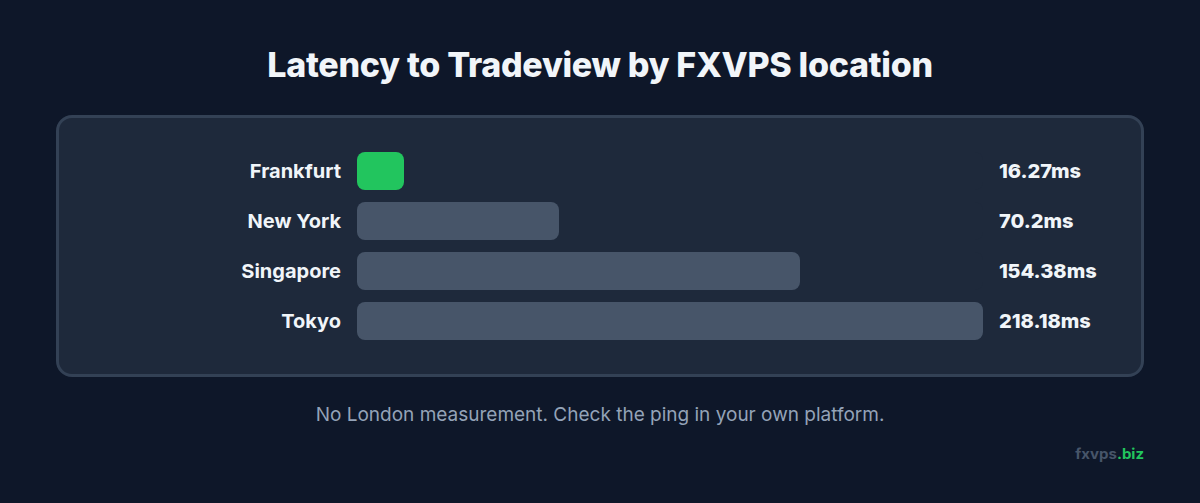
We measured the Tradeview trade server at 16.27ms from our Frankfurt location, 70.2ms from New York, 154.38ms from Singapore and 218.18ms from Tokyo. We have no London measurement for Tradeview, so check the ping in your own MT4, MT5 or cTrader before choosing. For context, Equinix LD4 and LD5 near London form the centre of the European FX market. A large share of the world’s spot FX liquidity is priced and matched on that campus, which is why so many no-dealing-desk brokers place their servers there: the closer the broker is to its liquidity providers, the tighter and more stable the aggregated price.
For the ILC account in particular, this matters. The account’s whole proposition is that your order is passed straight to aggregated liquidity. That hand-off happens on the broker’s side. The only part of the journey that takes place outside the building is the trip from your terminal to the server.
📊 Key Stat: FXVPS measured 16.27ms from Frankfurt to Tradeview, our fastest figure. From Singapore it was 154.38ms and from Tokyo 218.18ms, which is roughly what a distant home connection sees too.
If you want the background on why brokers cluster in these buildings, our Equinix data centers guide covers it.
FXVPS Latency to Tradeview Markets
FXVPS operates servers in London, New York, Frankfurt, Tokyo and Singapore. Our measured round trip to Tradeview is 16.27ms from Frankfurt. That is not a same-building number, but a datacenter connection holds steady through the London open, the New York overlap, and major news releases in a way home broadband does not.
The phrase “London server” gets used loosely in the VPS industry, and plenty of providers that advertise London are in a facility many kilometres and several network hops away from Slough. Our article on what “London server” really means explains how to tell the difference.
As always, verify on your own account. MT4 and MT5 show ping in the connection status bar. cTrader shows the proxy and its latency in the bottom-right corner of the platform.
Why Tradeview Markets Traders Specifically Need a VPS
ILC Is a Raw-Spread Account, and Raw Spreads Punish Latency
At $5 per round-turn lot and spreads from zero, the ILC account’s quoted cost on EUR/USD is around half a pip all-in. A single 0.3-pip slip on entry and another on exit more than doubles that. Slippage scales with the time your order spends in transit, so the traders who get the pricing they came for are the ones whose orders arrive in a couple of milliseconds. See our slippage and order fills guide.
cTrader cBots Run on Your Machine
Many Tradeview clients choose cTrader for its depth-of-market display and its C#-based automation. A cBot running in desktop cTrader executes on your computer: if the machine sleeps, loses power, or drops its connection, the cBot stops. Hosting cTrader on a VPS keeps cBots running continuously and close to the server. Our complete cTrader VPS guide walks through installation and tuning.
⚠️ Warning: cTrader is more demanding than MT4. It uses more memory per instance and more CPU when rendering depth of market and detailed charts. Running cTrader with several cBots on the smallest plan, alongside MetaTrader terminals, will cause lag. Size the VPS for cTrader first and add the rest afterwards.
Higher Deposits Mean Higher Stakes Per Outage
The ILC account’s $1,000 minimum, and the fact that most ILC traders deposit considerably more, means these are not throwaway accounts. An EA outage on a well-funded raw-spread account costs real money. A VPS that costs less than a single commission-heavy trading day is cheap insurance.
Scalpers and News Traders Are Welcome, If the Infrastructure Holds
Tradeview permits scalping and hedging. Short-duration strategies are the most latency-sensitive of all, and they tend to trade exactly when markets are fastest. Our scalping and high-frequency trading guide covers how to set a VPS up for that style.
🚀 Try FXVPS for $2.99 — get 7 days on the Core VPS risk-free and see the latency difference yourself. No long-term commitment, cancel anytime.
Recommended FXVPS Plan for Tradeview Markets
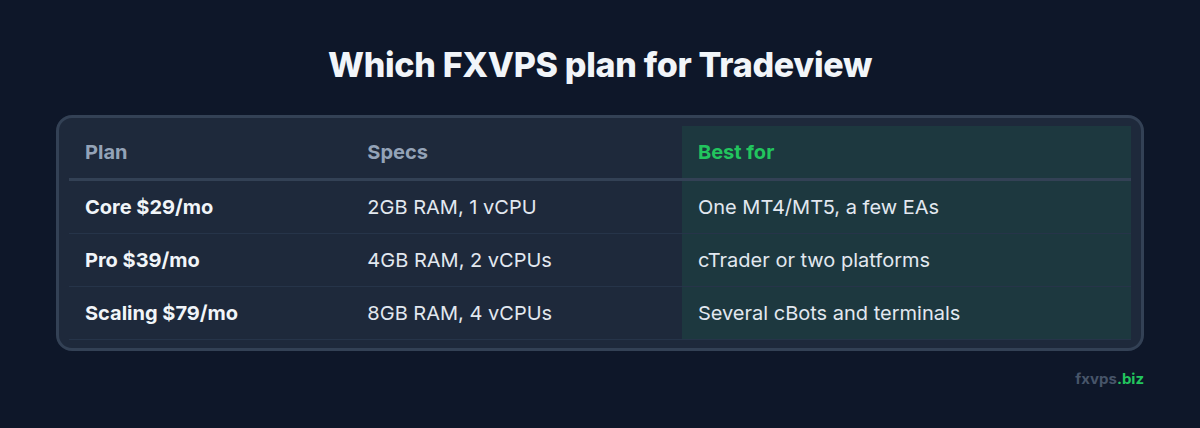
Core Plan ($29/mo) works for a single MT4 or MT5 terminal with a handful of EAs. With 2GB RAM and 1 vCPU, it is enough for a straightforward MetaTrader-only setup.
Pro Plan ($39/mo) is the recommended starting point for cTrader users and for anyone running two platforms. With 4GB RAM and 2 vCPUs, it gives cTrader the memory it wants and leaves room for a MetaTrader terminal alongside.
Scaling Plan ($79/mo) fits traders running cTrader with multiple cBots plus several MetaTrader terminals, or managing multiple accounts. With 8GB RAM and 4 vCPUs, platforms do not compete for resources during volatile periods.
💡 Tip: If you are choosing between MT5 and cTrader for an ILC account, the decision affects your VPS sizing. Our MT5 vs cTrader on a VPS comparison breaks down resource use, automation options, and execution features side by side.
Setting Up Tradeview Markets on Your FXVPS
-
Choose the Frankfurt datacenter at signup. It measured fastest to Tradeview at 16.27ms; confirm with the ping in your own platform.
-
Connect via RDP using the credentials FXVPS provides.
-
Download your platform from Tradeview’s website or client cabinet. Use Tradeview’s own MT4, MT5, or cTrader installer so the servers are preconfigured.
-
Log in. For MetaTrader, use your account number, password, and the server name from your welcome email. For cTrader, sign in with your cTrader ID and select the Tradeview account.
-
Check latency. In MetaTrader, read the ping in the bottom-right status bar. In cTrader, check the connection indicator in the bottom-right corner. From Frankfurt we measured 16.27ms.
-
Install your automation. Copy EAs into the MetaTrader data folder, or add cBots through cTrader’s Automate section. Start them and confirm they are running.
-
Trim the workspace. Close charts you do not need, remove unused symbols from the watchlist, and in cTrader close depth-of-market panels you are not actively using. Each one consumes CPU and memory.
-
Configure auto-start. Add platform shortcuts to the Windows Startup folder and save your logins so everything resumes after a reboot.
✅ Best Practice: In cTrader, confirm that your cBots restart after the platform relaunches. Restart cTrader once on purpose and check each cBot’s state. If your version does not restore running instances automatically, note it in your recovery routine and consider alerts so you know when the platform has restarted.
Why FXVPS for Tradeview Markets Traders
Tradeview’s ILC account is designed for traders who want their orders passed to real liquidity with minimal interference. FXVPS does the other part: your terminal runs on a measured 16.27ms path from Frankfurt, on dedicated CPU cores, with enterprise uptime.
That combination lets a raw-spread account behave like one. Compare plans at /pricing/, or verify the latency on your own ILC account with a $2.99 7-day trial.
Frequently Asked Questions
What VPS location should I pick for Tradeview Markets?
Frankfurt, which measured fastest at 16.27ms. We have no London measurement for Tradeview, so confirm with the latency reading in your platform after you log in.
Does Tradeview Markets allow EAs, cBots, and scalping?
Yes. Automated trading, scalping, and hedging are all permitted.
Is the Core plan enough for cTrader?
For a single cTrader instance with a light workspace, it can work. For cBots, depth of market, or cTrader alongside MetaTrader, Pro is the safer choice.
I trade stocks with Tradeview on Sterling or Lightspeed. Does a Frankfurt VPS help?
Not for US equities. Those platforms route to US markets, so Frankfurt is the wrong location for that workflow. This guide applies to Tradeview’s FX and CFD accounts on MT4, MT5, and cTrader.
Will a VPS reduce the ILC commission?
No. Commission and spread are set by the broker. A VPS reduces slippage and prevents downtime, which are the costs you can actually control.
Related Reading
- cTrader on VPS: Complete Guide — installation, cBots, and performance tuning
- Best VPS for LMAX — another LD4-based venue popular with experienced traders
- Best VPS for FXPro — a London-routed broker with MT4, MT5, and cTrader
- MT5 vs cTrader on a VPS — choosing the platform for your ILC account